Workforce Management Software for Australian Industries
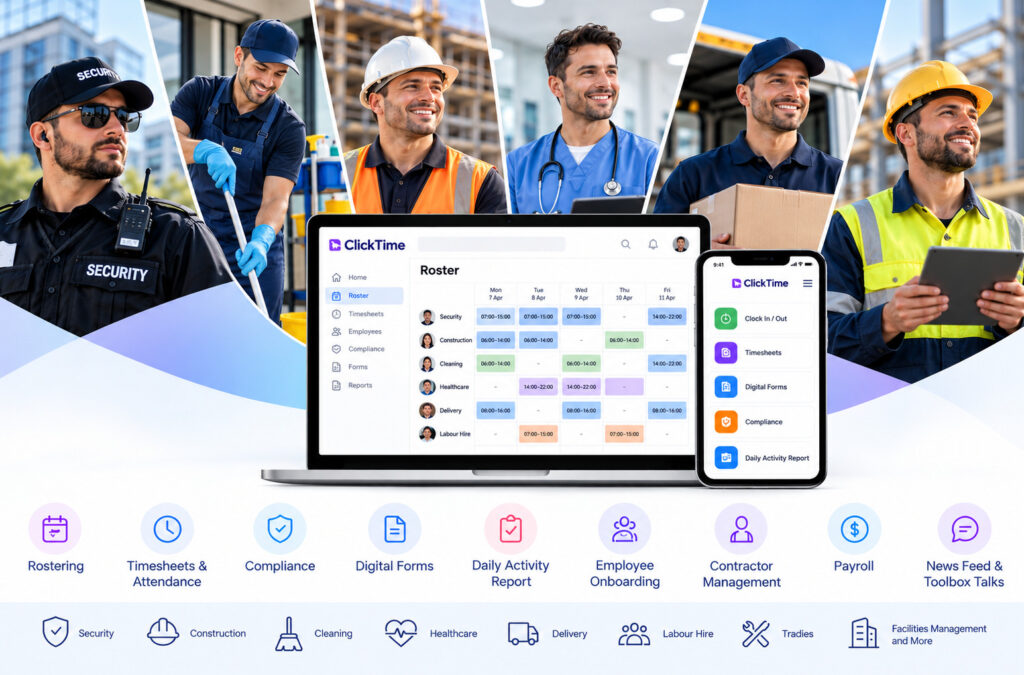
ClickTime brings essential workforce management tools together in one platform, helping Australian businesses simplify daily operations, improve visibility and reduce manual administration. Whether you manage security guards, construction crews, cleaning teams, healthcare staff or labour hire workers, ClickTime helps you coordinate your workforce from one central system.
Explore our workforce management features and discover how ClickTime can support your industry
Which Industries Does ClickTime Support?
Every industry has different workforce requirements. Some businesses manage employees across multiple client sites, while others coordinate project-based crews, mobile workers or rotating shifts.
ClickTime provides workforce management tools for businesses that need better control over scheduling, attendance, timesheets and employee compliance.
Explore our All Industries page to find the solutions most relevant to your business.
Contact a Real Person
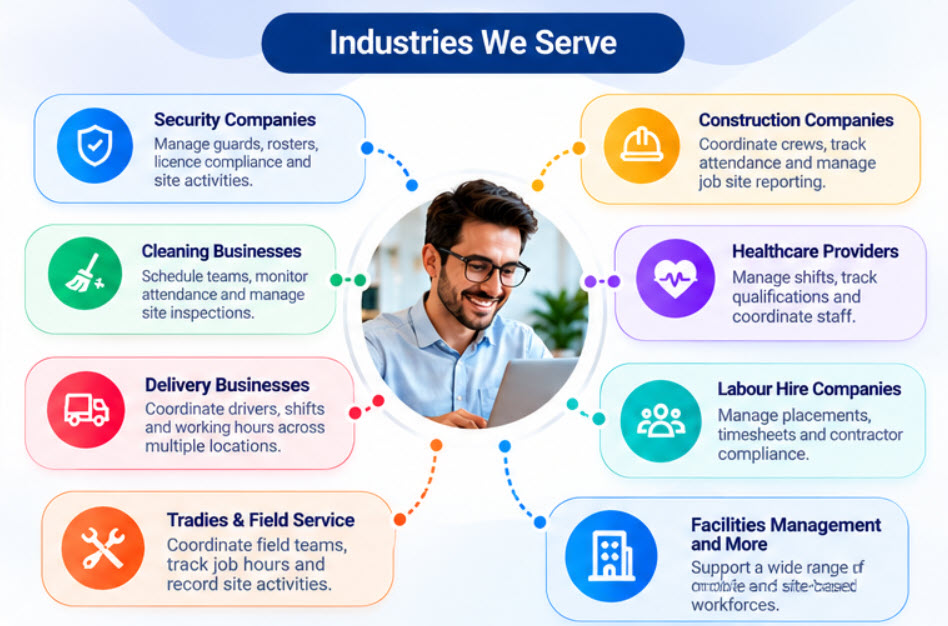
Security Companies
Security companies often coordinate guards across multiple client locations, shifts and contracts. Keeping track of rosters, attendance, licence requirements and site activities can create significant administrative work.
ClickTime helps security businesses manage guard scheduling, mobile clock-ins, timesheets and licence compliance. Managers can improve visibility across sites and maintain organised workforce records.
Discover our security workforce management solutions.
Construction Companies
Construction businesses need to coordinate workers across job sites, projects and changing schedules. Accurate attendance records and timely timesheet approvals help managers understand labour hours and keep projects organised.
ClickTime supports construction workforce scheduling, mobile attendance, timesheets, digital forms and daily activity reporting. Teams can record information from the field while managers maintain better visibility across their operations.
Explore our construction industry solutions.
Cleaning Businesses
Cleaning companies frequently manage employees across commercial buildings, offices and client premises. Coordinating site assignments, monitoring attendance and ensuring scheduled work is completed can be difficult without a central system.
ClickTime helps cleaning businesses organise rosters, record employee working hours and coordinate teams across multiple locations. Digital forms can also support inspections, checklists and site reporting.
Learn more about Cleaning Management Software.
Healthcare Providers
Healthcare providers need to coordinate shifts, manage employee availability and maintain records of relevant qualifications. Reliable scheduling and attendance information helps managers organise staffing across facilities and service locations.
ClickTime supports healthcare workforce scheduling, mobile timesheets, compliance tracking and employee communication. These tools help managers maintain organised records and improve visibility across their workforce.
Explore our Healthcare workforce solutions.
Delivery Businesses
Delivery businesses need to coordinate drivers, shifts and working hours across routes, depots and customer locations. Reliable attendance records help managers understand workforce coverage and organise daily operations.
ClickTime provides rostering, mobile attendance and timesheet tools to help delivery businesses coordinate employees and manage working hours more efficiently.
Visit our All Industries page to explore ClickTime’s industry coverage.
Labor Hire Companies
Labour hire businesses manage workers across different clients, assignments and job sites. They need efficient ways to allocate staff, collect approved timesheets and maintain visibility over worker availability and compliance.
ClickTime helps labour hire providers coordinate placements, record site attendance, manage timesheets and organise contractor or employee information. Better records can also support payroll and client billing processes.
Discover our Labour Hire Timesheet Software.
Tradies and Field Service Businesses
Tradespeople and field service teams often work across multiple jobs throughout the day. Businesses need accurate records of attendance, working hours, job activities and supporting documentation.
ClickTime helps businesses coordinate field crews, capture mobile timesheets and document site activities. GPS and geofencing capabilities can help verify attendance at approved job locations.
Explore our Tradies Timesheet Software.
Facilities Management and Other Industries
Businesses managing facilities, maintenance teams, contractors and mobile workers also need reliable workforce coordination. Scheduling, attendance records, digital inspections and site reporting can help simplify everyday operations.
ClickTime’s flexible tools can support a range of workforce requirements. The right configuration depends on your workflows, locations and operational needs.
Visit ClickTime All Industries to explore the available industry solutions.
Essential Workforce Management Features
Choosing workforce management software involves more than creating employee schedules. Businesses may also need mobile attendance, timesheet approvals, compliance monitoring, digital documentation, payroll preparation and reporting.
ClickTime combines a range of tools to help manage these processes in one platform. Explore the complete list of ClickTime features.
Employee Rostering Software
Creating and updating employee rosters manually can take time, especially when managing multiple locations, availability changes and shift replacements.
ClickTime’s online rostering tools help managers create schedules, assign shifts, publish rosters and coordinate employee availability. Shift reminders and roster visibility help keep employees informed about their upcoming work.
Learn more about Employee Rostering Software.
Mobile Timesheets and Attendance Tracking
Accurate working-hour records are important for payroll, job costing and workforce accountability. Manual timesheets can create additional administration and make it harder to verify attendance at remote sites.
ClickTime supports mobile clock-in and clock-out, timesheet management and GPS or geofencing options. Managers can review submitted hours and streamline timesheet approval before payroll processing.
Explore Timesheet Software.
Custom Timesheets
Standard timesheets may not capture every detail a business needs from its employees. Depending on the job, managers may need additional information about tasks, materials, mileage or site activities.
ClickTime’s custom timesheet functionality allows businesses to create tailored questions and collect additional job-related information. Employees can submit relevant details through the timesheet workflow, helping managers maintain more complete operational records.
Discover Custom Timesheets.
GPS and Geofencing
When employees work across different sites, businesses may need a way to verify where clock-ins and clock-outs occur.
ClickTime’s GPS and geofencing capabilities can help verify attendance against configured job-site boundaries. This supports better visibility for managers coordinating mobile teams and employees working at multiple locations.
Explore the ClickTime feature overview to learn more about attendance and time-tracking options.
Workforce Compliance and Licence Tracking
Managing licences, qualifications, certifications and expiry dates can be challenging when employee records are spread across spreadsheets and documents.
ClickTime helps businesses maintain workforce compliance records, monitor expiry dates and identify missing or outdated information. Depending on the configuration, managers can use compliance information when organising employees for shifts and assignments.
Learn more about Workforce Compliance Software.
Digital Forms, Inspections and Checklists
Paper forms can slow down inspections, safety checks and operational reporting. Digital forms make it easier for employees to submit information directly from their mobile devices.
ClickTime’s digital forms tools support custom forms, checklists, inspections, surveys, photos and electronic signatures. Businesses can organise submissions and make information available for review through the platform.
Discover Digital Forms and Checklists.
Daily Activity Reports and Site Diaries
Managers often need a reliable record of what happened during a shift or at a particular job site. Photos, notes and activity records can help explain progress, delays and important observations.
ClickTime’s daily activity reporting tools help teams document site activities, attach supporting evidence and share operational updates. This gives managers a clearer record of work completed and events reported in the field.
Employee Onboarding and Job Applications
Recruiting new employees involves collecting applicant information, gathering documents and preparing successful candidates for work. Manual processes can create unnecessary paperwork and delays.
ClickTime’s employee onboarding solution helps businesses manage online job applications and streamline the collection of employee information and documents. This can make it easier to organise onboarding information before new staff begin their assignments.
Discover Employee Onboarding Software.
Contractor Management
Businesses working with contractors need organised records of contractor details, documents, insurance and relevant certifications. They may also need to coordinate assignments and collect timesheets.
ClickTime’s contractor management tools help centralise contractor information and support workforce coordination across sites and clients. This can reduce reliance on separate spreadsheets and disconnected administrative processes.
Explore the All Features page for more information.
Payroll and Award Interpretation
Preparing payroll requires accurate working hours and appropriate pay rules. Depending on the applicable award, agreement and employment arrangements, calculations may involve overtime, penalty rates, public holidays and breaks.
ClickTime provides payroll-related tools to help configure pay rules, review timesheets and prepare information for payroll processing. Supported integrations can reduce duplicate data entry between workforce management and payroll systems.
Learn more about ClickTime Payroll.
News Feed and Toolbox Talks
Keeping employees informed about workplace procedures, safety instructions and operational updates is essential for teams working across multiple locations.
ClickTime’s news feed and toolbox talk functionality helps businesses share information with employees and collect acknowledgements where required. This provides a central way to communicate important updates to field-based and site-based teams.
Explore the ClickTime All Features page to discover more workforce communication tools.
Frequently Asked Questions
Workforce management software helps businesses organise employee schedules, record working hours, manage attendance and coordinate workforce-related processes. Depending on the platform, it may also include compliance tracking, digital forms, reporting and payroll integrations.
ClickTime supports businesses such as security companies, construction firms, cleaning businesses, healthcare providers, delivery operations, labour hire companies and trades businesses. Its suitability depends on the workflows and features required by each organisation.
Explore the ClickTime All Industries page for industry-specific information.
ClickTime supports workforce scheduling and attendance management across different locations. GPS and geofencing options can help businesses verify employee clock-ins and clock-outs against configured site boundaries.
Yes. ClickTime offers mobile timesheet and attendance functionality, allowing employees to record working hours through supported mobile workflows. Managers can review and process timesheets through the platform.
See Timesheet Software for further details.
Yes. ClickTime’s custom timesheet functionality allows businesses to collect additional information relevant to their work. Custom questions can help capture details beyond basic clock-in, clock-out and working-hour records.
Visit the Custom Timesheet page to learn more.
ClickTime provides compliance tracking for employee licences, qualifications, certifications and expiry dates. This helps businesses maintain organised records and identify items that may require renewal or attention.
See Workforce Compliance Software for more information.
Yes. ClickTime’s digital forms functionality supports custom forms, inspections, checklists, surveys and the collection of information such as photos and electronic signatures.
Explore Digital Forms and Checklists.
ClickTime provides an employee onboarding solution that supports online job applications and the collection of employee information and documents. This helps businesses organise information for new starters.
Learn more about Employee Onboarding Software.
ClickTime offers payroll-related functionality and integrations with supported payroll systems. The available integration and workflow depend on the payroll product and configuration, so businesses should confirm compatibility before implementation.
Visit the Payroll page for further information.
Start by identifying your main workforce challenges, such as rostering, mobile attendance, compliance, contractor management or field reporting. Then review the relevant feature pages and compare the available functionality with your business requirements.
Browse the All Features page or explore the All Industries page to get started.