
Timesheet Software
With our time tracking options, you can significantly streamline the process of reviewing, verifying, inputting, and analyzing employee timesheets

Time Card Approval
Employees submit their timesheets, which managers then review, adjust, and approve. Ensures time cards are accurate before being sent for payroll.

Customize Your Timesheet
Capture every detail and gain more valuable business data with a more detailed look at how your team spends time. Create Your own business timesheet

Overtime Calculations
Create your own custom rules. your OT Calculations are done correctly. These Overtime Types include daily & weekly rules. 40 hour Work Weeks, California Overtime, No Overtime, and 38 Hour Work Weeks.

Fully Customisable Pay Templates
Create dynamic Pay Templates based on each day of the week and working hours. Whether it’s day shifts, night shifts, or specific time spans, our platform empowers you to define precise rules for accurate compensation

Time Clock Software Features To Help You Manage Your Employees’ Time
Simplify Payroll and Budgeting
Run custom reports, or export everything to Excel & CSV with ease. Our Payroll Integration accepts most common software, making it simple and efficient to run payroll and manage your workforce data seamlessly.

Auto Break Time Deduction Rules
Simplify break time management with ClickTime. Set your break rules, and we’ll handle the tracking and deductions automatically. Our system ensures accurate break time tracking, so you can focus on what matters most.

leave & Time Off
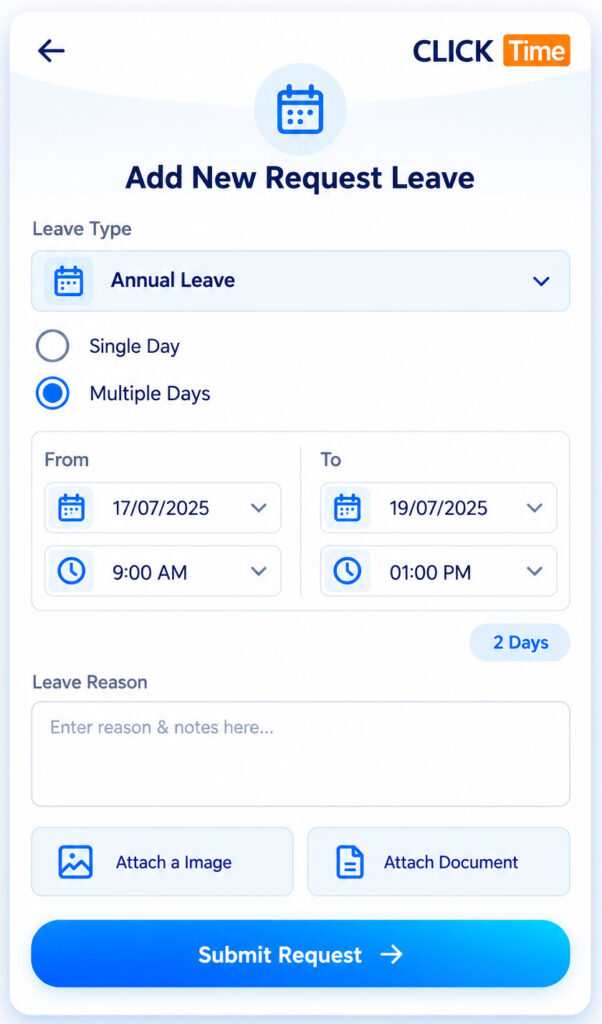
Easily track time-off requests with our system that allows employees to book or request time off. We support paid and unpaid time off

Check ClickTime Blogs
PTO/Sick/Vacation
Administrators and Manager’s can add PTO for their employees. You have the flexibility to approve PTO as employees request it. Upload Medical Leave Attachment
Payroll Integrations
Integrations make your life easier, so we have payroll integration up with several providers including QuickBooks, Keypay, MYOB and ADP to help make your experience with ClickTime more seamless. Don’t see yours on the list? Let us know!

Dynamic Reports & Live Dashbaord
Make Smarter Decisions with Dynamic Reporting. Customize reports to fit your needs and gain insights using real-time data and live dashboards. Access key metrics instantly, collected seamlessly from remote sites, for a thorough understanding of your business operations.

GPS & GeoFencing Timesheet
Looking to monitor employee time at remote sites? Our GPS tracking feature enables you to gather GPS data from your team. You have the flexibility to make this feature optional or required.

Flexible Time Clocking Options
Make ClickTime work for your business, you can enable employees to use mobile clock in and out, , QR Codes , crew clock in or manual timesheet input.

Auto Clock Out & Auto Approvals
Streamline your workflow with rule-based Auto Clock Out & Auto Approvals. Define the rules, and ClickTime will manage the process, saving you time and effort.
Timesheet Rounding
Customize your clock in and out times to align seamlessly with your shift schedules, job site working hours, or opt for standard rounding. With ClickTime, you have the flexibility to tailor your time tracking to suit your unique business needs
Construction Timesheet Software
Drive Efficiency and Stay Competitive With Construction Management & Time-Tracking Software
Cleaning Timesheet Software
Manage your cleaning staff’s schedules and communication in one easy-to-use platform
Frequently Asked Questions
Online timesheet software allows businesses to record, manage and approve employee working hours digitally. Employees can submit their hours using a mobile app or web platform, while managers review timesheets, identify discrepancies and prepare records for payroll.
How ClickTime helps: ClickTime provides digital timesheets and workforce management tools that help Australian businesses manage employee working hours, review attendance records and reduce manual timesheet administration.
Businesses can track remote employee working hours using mobile timesheet apps that allow employees to clock in and out, record attendance and submit timesheets from different locations. GPS verification can also help businesses confirm attendance at designated job sites when required.
How ClickTime helps: ClickTime supports mobile clock-in and clock-out, GPS and geofencing features, helping businesses record attendance for employees working across multiple locations.
Yes. Mobile timesheet apps allow employees to record working hours, clock in and out, and access attendance information from their smartphones. This is particularly useful for remote workers, field staff, security guards and employees who do not work at a central office.
How ClickTime helps: ClickTime’s mobile app allows employees to manage their attendance and timesheets while working at different job sites, reducing reliance on paper timesheets and manual data entry.
Yes. Some online timesheet solutions use GPS to record location information when employees clock in or out. Geofencing can add another layer of verification by detecting when employees enter or leave a defined work-site boundary.
How ClickTime helps: ClickTime combines digital timesheets with GPS and geofencing functionality to help businesses verify employee attendance at designated job sites and maintain more reliable attendance records.
Yes. Online timesheet software typically allows managers or supervisors to review submitted hours, identify errors, request corrections and approve timesheets before payroll processing. Digital approval workflows can reduce paperwork and improve visibility over employee hours.
How ClickTime helps: ClickTime allows managers and supervisors to review and approve employee time records through the web portal. In addition, they can use the ClickTime mobile app to manage timesheet approvals on the go, verify attendance and keep timesheet processes moving, even when they are away from the office.
Yes. Workforce timesheet software can organise attendance records by employee, shift and work location, making it easier to manage teams working across different sites. This is especially useful for security companies, labour hire businesses, cleaning contractors and construction businesses.
How ClickTime helps: ClickTime combines employee rostering, job-site management and digital timesheets to help Australian businesses coordinate staff across multiple locations and manage attendance against scheduled work.
Some timesheet systems support configurable pay categories and overtime calculations to help businesses identify ordinary hours, overtime, weekend work and public holiday shifts. The available functionality depends on the software, and calculations should be configured to reflect the applicable award, enterprise agreement or employment arrangements.
How ClickTime helps: ClickTime helps businesses record employee working hours and manage timesheets for different shifts and work arrangements. Businesses should confirm that their required overtime and award interpretation rules are supported by their ClickTime configuration and payroll workflow.
Many online timesheet systems integrate with payroll or accounting platforms such as Xero and MYOB, or provide timesheet exports. These connections help businesses transfer approved employee hours, reduce duplicate data entry and simplify payroll preparation.
How ClickTime helps: ClickTime supports Xero and MYOB integrations, helping businesses connect workforce timekeeping with payroll processes and reduce the administrative effort involved in processing employee hours.
Yes. Online timesheet software is particularly useful for employees who work away from an office, including security guards, cleaners, construction workers and mobile service teams. Features such as mobile clock-in, GPS verification, rostering and digital attendance records can help businesses manage distributed workforces.
How ClickTime helps: ClickTime is designed for workforce management across multiple job sites, with features including employee rostering, mobile attendance, GPS and geofencing, timesheets and security workforce compliance management.
Digital timesheets help reduce manual data entry, missing records and discrepancies between scheduled shifts and recorded working hours. By centralising attendance data and introducing digital review and approval processes, businesses can improve the accuracy of payroll preparation.
How ClickTime helps: ClickTime connects rostering, mobile attendance and digital timesheets to help businesses compare scheduled work with recorded attendance, review working hours and streamline payroll preparation.