Rostering Software

Build staff rosters for Australian teams around availability, skills and demand

Employee Rostering Software

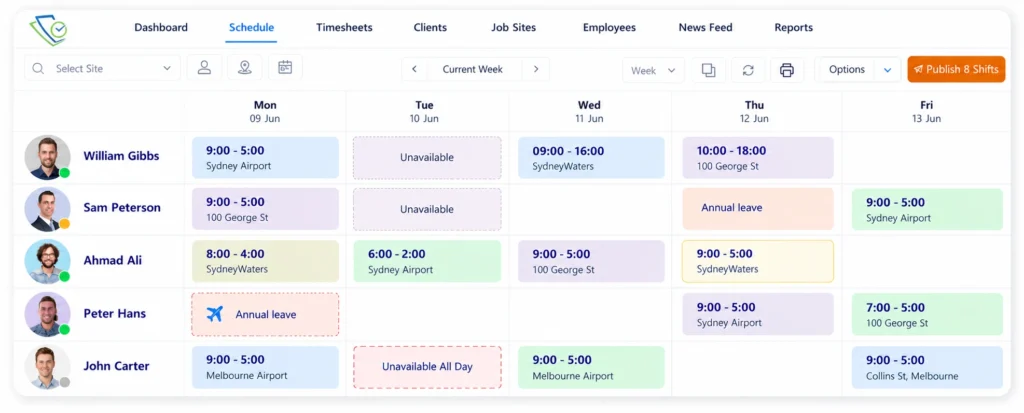
Create employee schedules that reflect your staffing requirements, working hours and team availability. ClickTime helps managers assign employees to suitable shifts, review coverage and adjust schedules when business needs change.

From Shift Planning to Workforce Cost Control

Plan employee coverage, communicate schedules and review labor requirements within one connected workflow. Use roster information to understand where staff are assigned and identify scheduling gaps before they affect daily operations.

Create Roster

Calendar

Publish Roster

Send in Blue

Streamline you Operations

2020-09-06_11-54-45

Cost Control

Job Anaysis
Employee Rostering Software

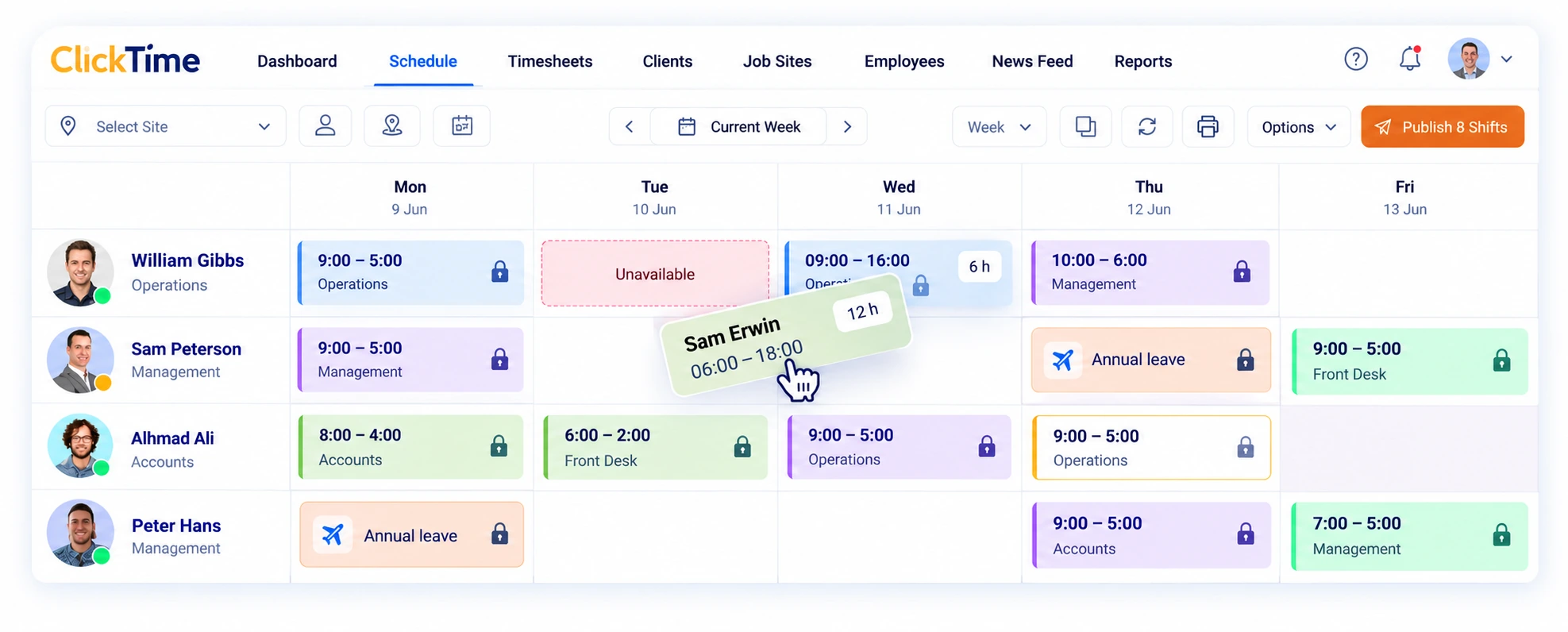
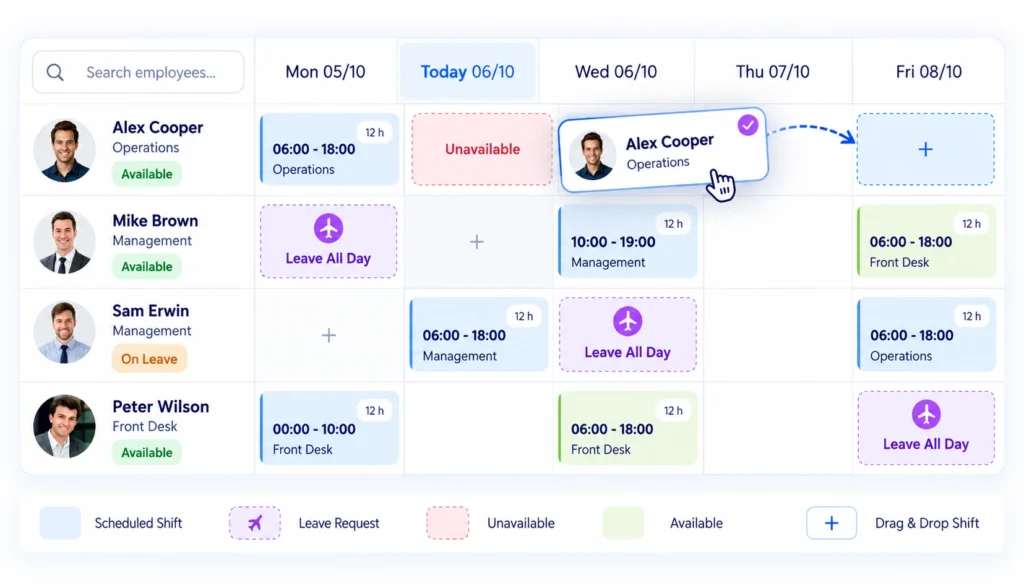
Easily Assign, Copy/duplicate and move shifts using drag and drop features. Save time and effort.

Online Rostering Software

Rostering Software

Coordinate Employee Availability, Leave and Shift Assignments

Review employee availability and leave requests alongside planned shifts. This helps managers make informed allocation decisions and reduce the need to rearrange rosters after they have been prepared.

Employee Rostering Software

Identify Employee Scheduling Conflicts Before Publishing

Check employee shift assignments for overlaps and availability issues before finalising the roster. Resolving conflicts helps managers avoid allocating an employee to incompatible shifts and reduces scheduling changes.

Protect Published Employee Schedules from Unauthorised Changes

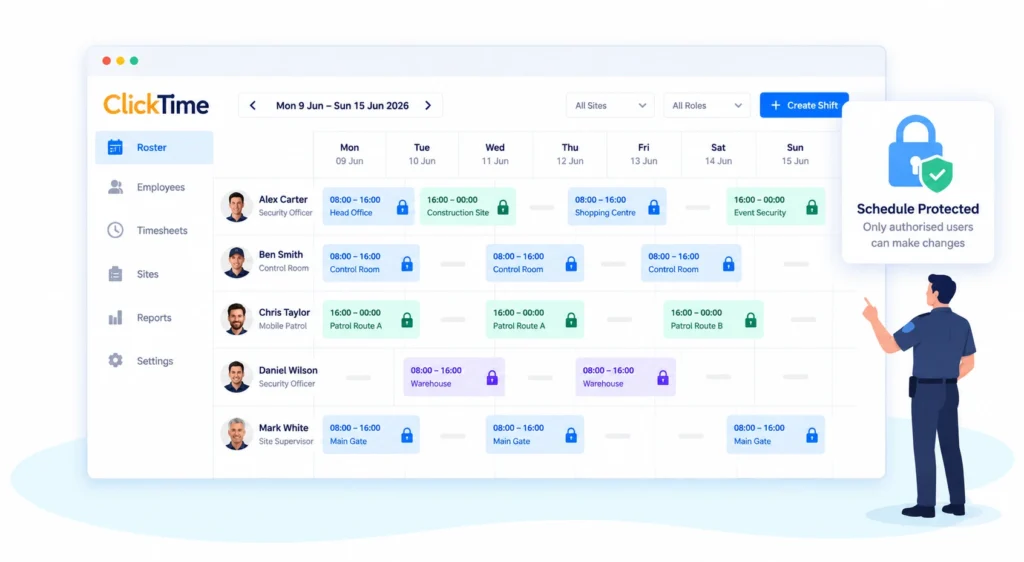
Use Click Time’s roster-locking functionality to help control changes after a schedule has been finalized. This supports a consistent process for managing approved shifts and communicating any authorized amendments.
 
Employee Rostering Software

See Employee Availability, Time Off and Upcoming Shifts Together

Bring scheduled work, employee availability and leave requests into the same planning process. Managers can review who is available, identify potential coverage gaps and make adjustments before publishing schedules.

Roster Publishing

Circled Dot

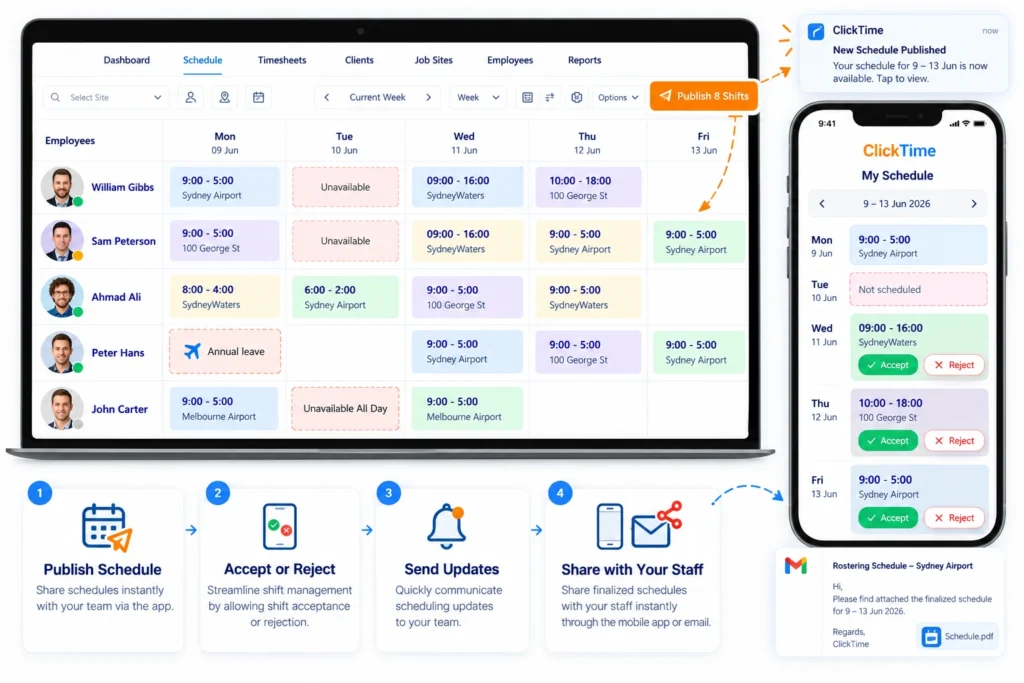
Share Schedules Instantly with Your Team via the App

Circled Dot

Streamline Shift Management by Allowing Shift Acceptance or Rejection

Circled Dot

Quickly Communicate Scheduling Updates to Your Team

Circled Dot

Share the Finalized Schedule with Clients Instantly via Email or Online

View Employee Shifts, Availability and Leave in One Place

Circled Dot

View employee schedules in the format that works best for your business. Flexible roster views help managers quickly assess coverage, track availability and make informed scheduling decisions.

Circled Dot

Easily view employee availability and leave requests directly within the scheduling interface. This real-time information empowers you to make informed decisions & avoid scheduling conflicts.
Employee Rostering Software

Excel Wasn't Built for Staff Scheduling

Build Rosters Faster with Shift Patterns

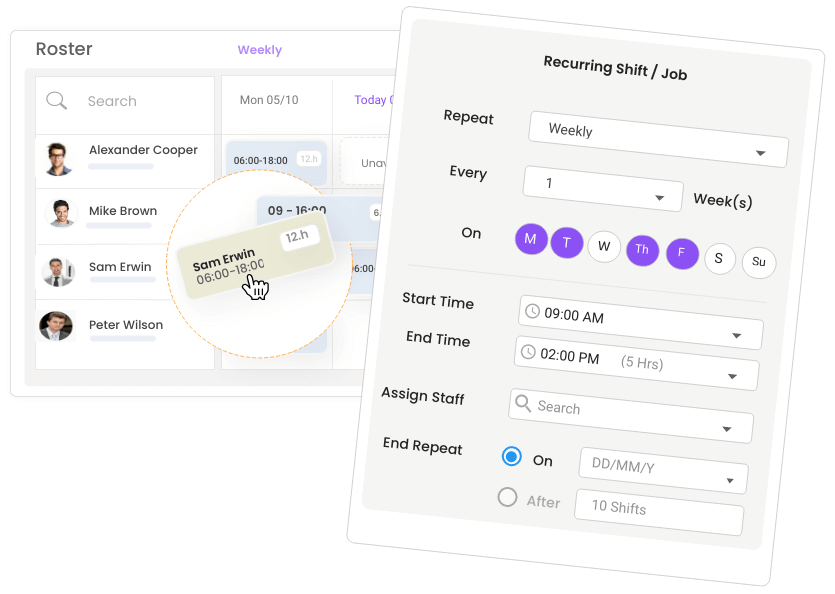
Set up recurring shifts for employees who follow regular working patterns. Reusing established schedules can reduce repetitive data entry and make it easier to maintain coverage across successive roster periods.

Quickly fill a shift or find a substitute

When an employee becomes unavailable, review suitable available staff and identify a replacement. This helps managers respond to absences and maintain planned staffing levels without rebuilding the entire roster.


Fatigue Risk Management

Apply configured working-hour and consecutive-day limits to support safer scheduling decisions. Review the proposed roster for potential fatigue risks before assigning additional shifts.

Break Time Deduction​

Set your own rules for automatic break deductions based on your industry requirements, workplace policies, and award conditions. Ensure breaks are applied consistently and accurately across your workforce without manual calculations.

End-to-End Employee Scheduling

From preparing shifts and communicating changes to reviewing attendance and timesheets, ClickTime connects key workforce tasks so managers can work with a clearer view of planned and actual staffing.

Employee Rostering Software

Repeat & Recurring Shifts

Schedule shifts without limits

Manage seasonal demand and recurring shift patterns with tools that simplify workforce planning and help maintain optimal staffing levels.

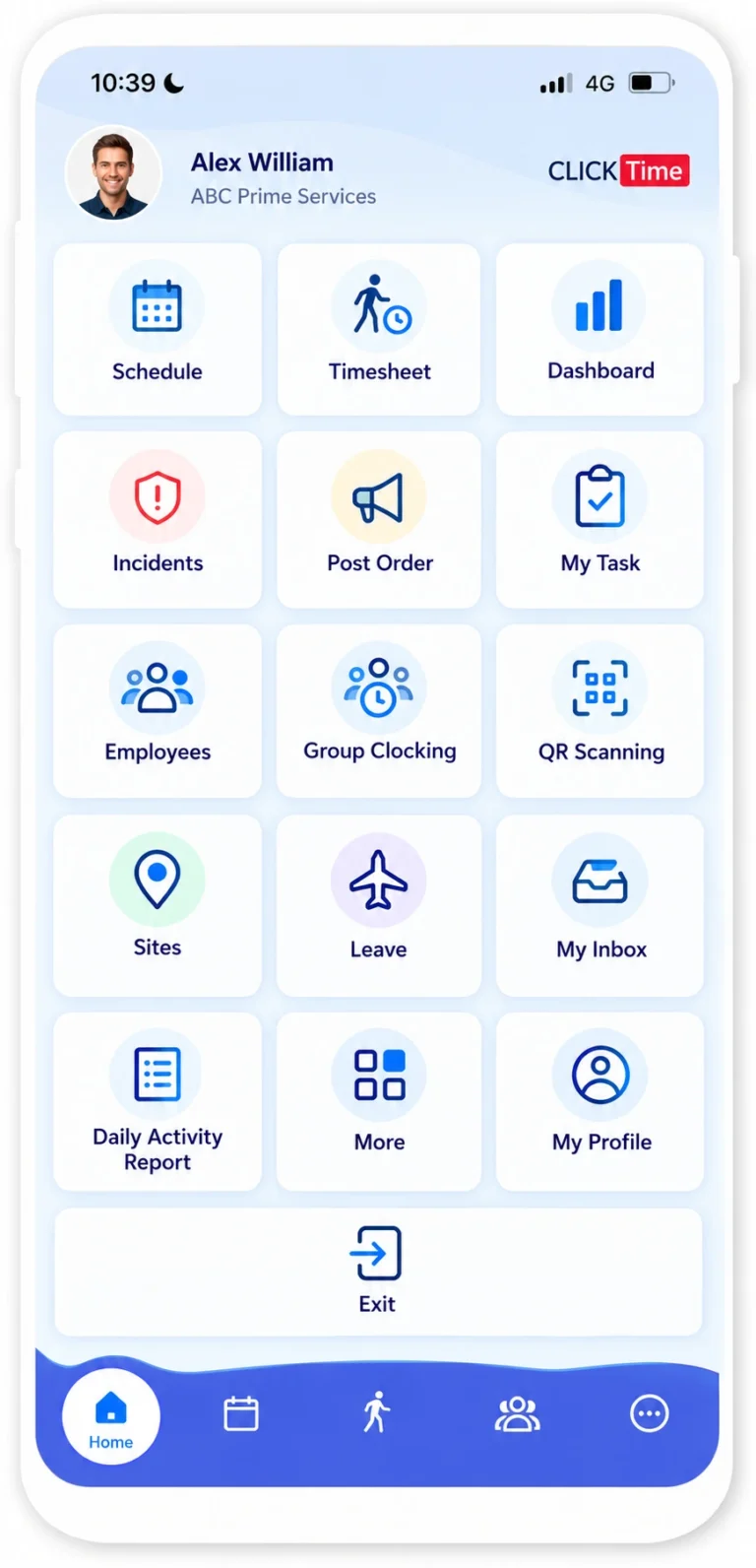
Update Employee Assignments from the Mobile App

Maintain your roster on the go, add new shifts, edit, delete & publish your roster from the palm of your hand

Compare Scheduled Hours with Recorded Employee Time

View your staff’s timesheet, add & edit your staff’s timesheet, approve & decline timesheet records

Identify Absences, Late Arrivals and Missing Clock-Outs

See who is working, late, absent, left the job site, left early , missing clock out, and much more..

Plan Future Shifts Around Leave and Availability Requests

View and approve staff leave requests. View staff availability for work

Employee Rostering Software

Targeted Timesheet Questions by Role or Team

Customize timesheet questions by role or team—target everyone or drill down to specific positions for more relevant data.

Site-Specific Question Targeting

Apply questions by site—target all locations, select specific ones, or filter by client-linked sites for precise relevance.

Document Sharing

Keep your team informed and compliant with our Document Hub feature. Easily upload and share essential documents, from standard operating procedures and work health and safety guidelines to company policies and updates.

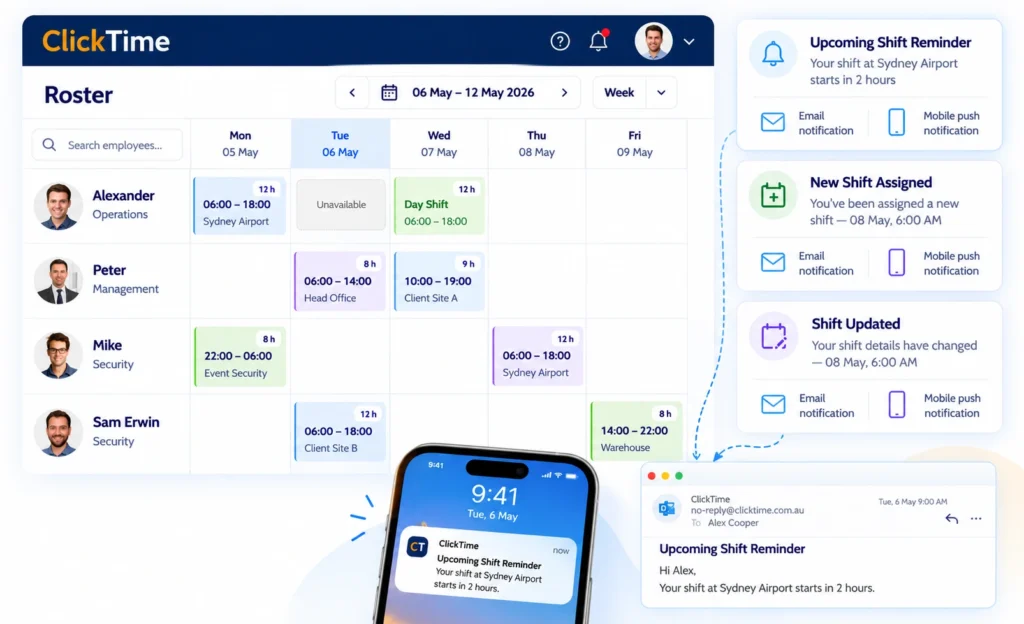
Help Employees Prepare for Their Upcoming Shifts

No more excuses, employees are automatically reminded by email & mobile push notification when they have upcoming shifts.

Let Employees Confirm Whether They Can Work an Assigned Shift

Publish and assign shifts, and have employees accept or decline them via ClickTime mobile app. Simplify your scheduling and streamline operations.

Employee Rostering Software

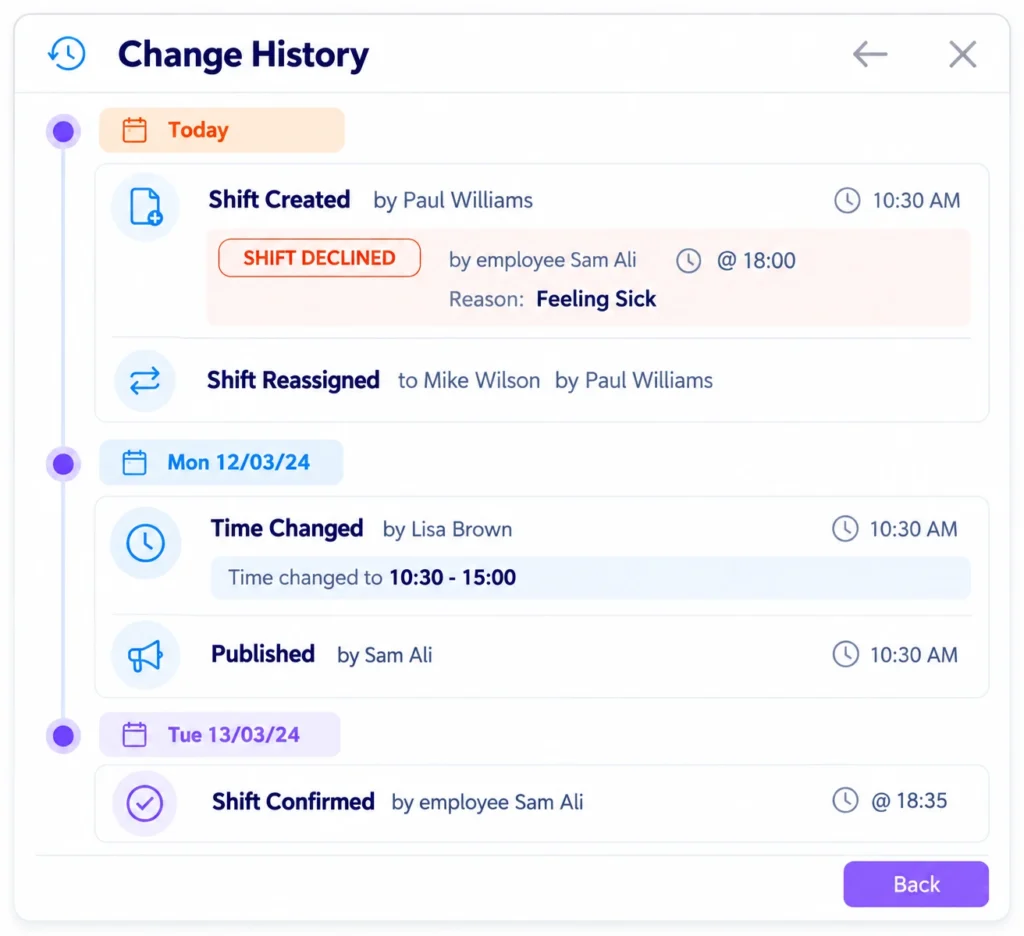
Review Who Changed an Employee Shift and When

Using Shift History, you can find out when a shift was created, who assigned it, when it was published, when it was changed and who completed the actions.

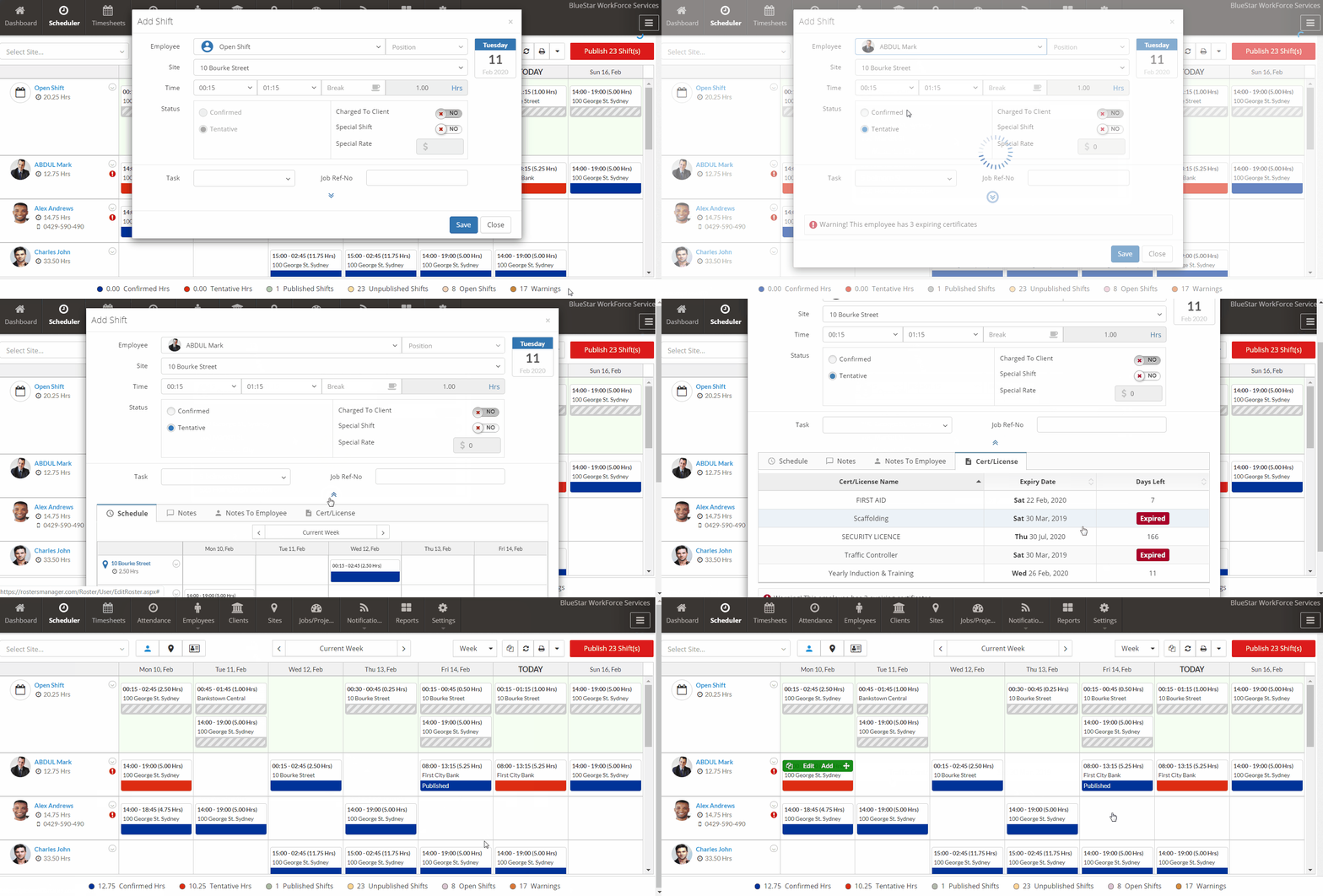
Review Expiring Credentials Before Assigning Employees

Employee Rostering Software

More ways to roster smarter

Questions & Answers

ClickTime helps managers organise employee schedules and review shift assignments to identify potential scheduling conflicts. By checking availability and overlapping shifts before publishing a roster, businesses can reduce double bookings, minimise last-minute changes and improve workforce coordination.

ClickTime provides leave and availability management features that help managers review employee commitments when preparing rosters. By considering availability and approved leave during scheduling, managers can identify potential conflicts and organize alternative coverage before finalizing employee assignments.

ClickTime supports recurring shifts, allowing managers to reuse regular scheduling patterns rather than creating every shift individually. This reduces repetitive roster preparation and helps businesses maintain consistent schedules while making adjustments when employee availability or operational requirements change.

Answer: Yes. Advanced rostering software automatically applies industry award rates, penalty rates, union rules, mandatory break times, and minimum rest periods between shifts. The system alerts managers to potential compliance breaches or overtime costs before schedules are finalized, ensuring adherence to local labor laws

Answer: Yes, modern rostering platforms feature peer-to-peer shift swapping. When an employee requests a swap, the system verifies that the replacement employee has the required skills, certifications, and availability without exceeding maximum weekly hours. Managers retain full control with an optional final approval step before the schedule updates

Answer: Yes, seamless integration with payroll systems (e.g., Xero, MYOB, KeyPay) and time clocking apps is a core feature. Clock-in/out data automatically populates digital timesheets, comparing scheduled hours against actual hours worked. This eliminates manual data entry, prevents payroll errors, and streamlines export for payment processing.

Yes. ClickTime supports payroll integrations including Xero and MYOB, helping businesses transfer approved workforce information into their payroll processes.

Answer: The software provides real-time wage forecasting as you build the schedule. By calculating projected gross pay (including penalty and overtime rates) in real-time, managers can identify high-cost shifts and adjust staffing levels before publishing the roster to ensure budgets are met.

Yes. Workforce compliance features help businesses maintain employee licence and qualification records, monitor expiry dates and identify missing or expired documents. More advanced systems can link required qualifications to specific roles or positions to help managers check eligibility before assigning shifts.
ClickTime supports employee licence and certificate records, expiry reminders and compliance management. Linking required qualifications to roles can also help businesses manage different compliance requirements across their workforce.

When choosing rostering software, look for an easy-to-use roster builder, employee availability management, shift assignment, mobile access, attendance tracking, timesheets and payroll integration. Businesses in regulated industries should also consider licence and qualification compliance.
ClickTime combines employee rostering with mobile attendance, GPS and geofencing, timesheets, compliance management and Xero and MYOB payroll integrations, helping businesses manage more of their workforce operations in one place.

Yes. Mobile rostering allows employees to access their schedules without needing to contact a manager for every update. Depending on the software, employees may also be able to submit their availability, manage leave requests and respond to shift offers.
With ClickTime, employees can use the mobile app to access their schedules and relevant workforce features, helping managers and employees stay connected when working across different locations.

Yes. Many rostering systems include time and attendance features that record when employees start and finish work. Comparing rostered shifts with actual attendance helps managers identify late arrivals, early departures and discrepancies before approving timesheets.
ClickTime combines rostering with mobile clock-in and clock-out, GPS and geofencing capabilities, and timesheet management to help businesses monitor attendance at job sites.

ClickTime brings employee rostering together with leave and availability management, helping managers consider employee commitments when planning shifts. This makes it easier to identify potential staffing gaps, organise replacement coverage and prepare rosters around planned absences.