Workforce Rostering Software for Australia
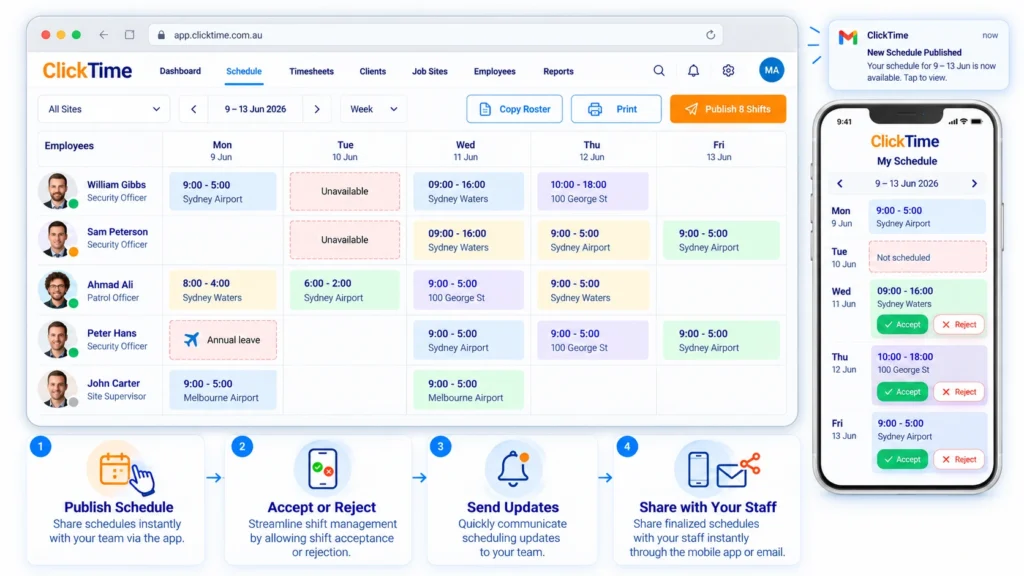
Creating an effective staff roster is essential for keeping your business running smoothly. Whether you manage a retail store, hospitality venue, cleaning business, healthcare team or construction workforce, having the right employees available at the right time helps improve productivity, control labour costs and deliver better customer service.
However, managing employee schedules can quickly become complicated. Staff availability changes, unexpected absences, last-minute shift replacements and increasing administrative workloads can make rostering a time-consuming task.
The good news is that with the right planning and staff rostering software, businesses can simplify scheduling, reduce mistakes and manage their workforce more efficiently.
In this guide, we explore 10 practical tips to help Australian businesses create better staff rosters and explain how technology can make employee scheduling easier.
What Is Staff Rostering?
Staff rostering is the process of assigning employees to specific shifts, dates, times and locations according to business requirements and employee availability.
An effective staff roster ensures that your business has sufficient staff to meet operational demands while balancing employee availability, qualifications, working hours and labour costs.
Traditionally, businesses have managed rosters using spreadsheets, paper schedules, phone calls and email. While these methods may work for small teams, they become increasingly difficult to manage as the workforce grows or employees work across multiple locations.
Modern staff rostering software allows businesses to create schedules, communicate shift changes, monitor attendance and manage workforce information from one central platform.
Contact a Real Person
10 Tips to Improve Your Staff Rostering
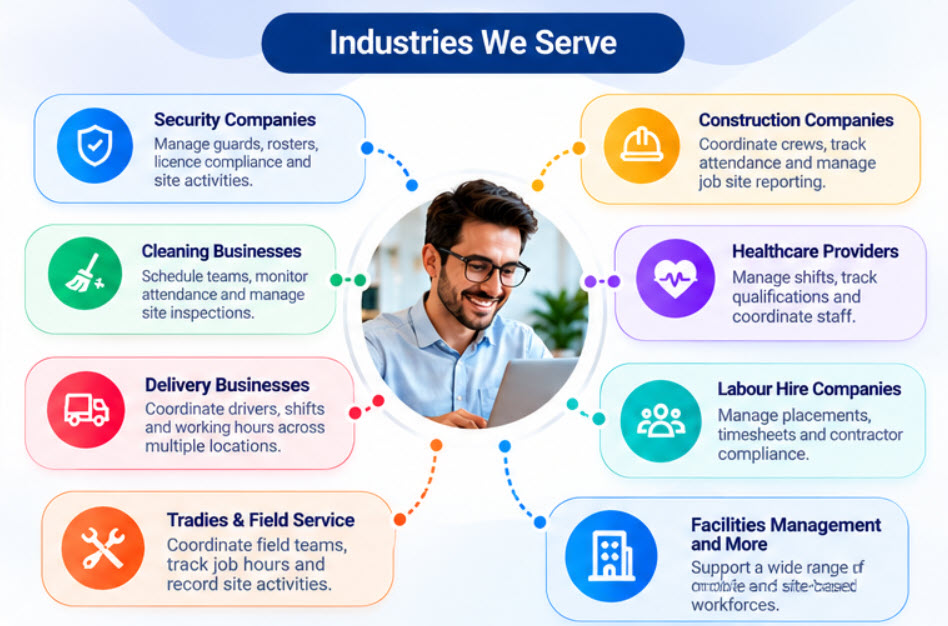
Security companies often coordinate guards across multiple client locations, shifts and contracts. Keeping track of rosters, attendance, licence requirements and site activities can create significant administrative work.
ClickTime helps security businesses manage guard scheduling, mobile clock-ins, timesheets and licence compliance. Managers can improve visibility across sites and maintain organised workforce records.
1. Plan Your Rosters Around Business Demand
An effective roster starts with understanding how many employees your business needs at different times.
For example, a retail business may require additional staff during weekends and promotional periods, while a cleaning company may need employees available across several client locations throughout the day.
Review your historical workloads, customer demand, upcoming projects and operational requirements before preparing your roster.
Planning ahead helps you avoid unnecessary labor costs during quieter periods and staff shortages when demand increases.
2. Check Employee Availability Before Assigning Shifts
One of the most common rostering problems is assigning shifts without confirming employee availability.
Employees may have existing commitments, approved leave, study schedules or other work arrangements that affect when they can work. Assigning unavailable employees can result in shift changes, additional administration and unnecessary frustration.
Maintain accurate availability records and consider employee preferences when preparing schedules.
Using staff rostering software can make this process easier by keeping availability information accessible when you assign shifts.
3. Assign the Right Employees to the Right Shifts
Not every employee is suitable for every shift or task. Depending on your industry, particular roles may require specific skills, qualifications, training or experience.
For example, a healthcare provider may need appropriately qualified care staff, while a construction business may require workers with particular licences or safety training.
Before assigning a shift, check that the employee meets the relevant job requirements and has the necessary qualifications.
Maintaining accurate employee records and monitoring certification expiry dates can also help businesses reduce compliance risks and ensure suitable employees are scheduled.
4. Publish Rosters in Advance
Giving employees sufficient notice of their upcoming shifts helps them organise their personal commitments and prepare for work.
Late roster changes can create confusion, increase absenteeism and make it harder for employees to plan their week.
Where practical, establish a consistent schedule for preparing and publishing rosters. Consider your operational requirements, employee agreements and applicable workplace obligations when deciding how much notice to provide.
Publishing rosters digitally also allows employees to access their schedules without needing to contact a manager or search through old messages.
5. Communicate Shift Changes Quickly
Even the best-planned roster may need to change. An employee might call in sick, a project may run longer than expected, or a business may need additional staff at short notice.
When changes occur, employees need to know about them promptly.
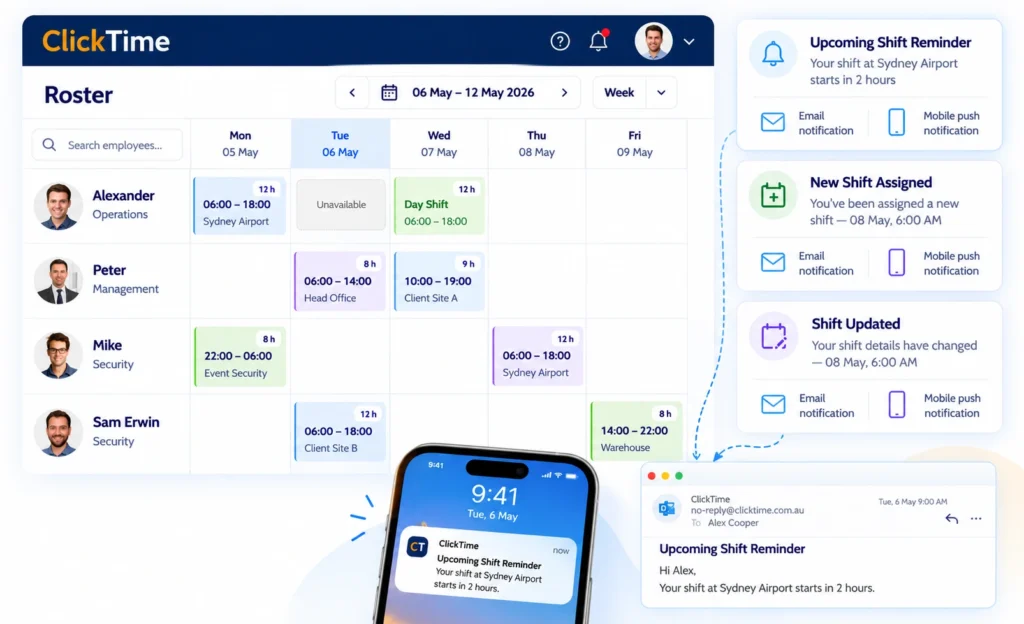
Use a clear communication process to notify employees when new shifts are assigned or existing shifts are modified or cancelled.
Staff rostering software with automatic notifications can help ensure employees receive timely updates about their schedules. This reduces the need for managers to contact employees individually and helps prevent misunderstandings about shift times.
6. Have a Process for Managing Unfilled Shift
6. Have a Process for Managing Unfilled Shifts
Unexpected absences and employee unavailability can leave important shifts uncovered.
Without a clear process, managers may spend hours making phone calls, sending text messages and checking spreadsheets to find someone who can work.
Create a reliable process for identifying available employees, confirming their suitability and assigning replacement shifts.
Keeping employee availability and relevant qualifications up to date makes it easier to identify suitable replacements when staffing requirements change.
For businesses managing large teams or multiple locations, centralized rostering software can help managers coordinate staffing requirements more efficiently.
7. Track Attendance Against the Published Roster
Creating a roster is only part of workforce management. Businesses also need to know whether employees arrive on time, complete their scheduled shifts and record their working hours accurately.
Manual attendance records can lead to errors, missing information and time-consuming timesheet corrections.
Digital clock-in and clock-out functionality can help businesses compare scheduled shifts with actual attendance.
Depending on the software, features such as GPS location verification and geofencing can also help businesses confirm that employees clock in or out at designated work locations.
Accurate attendance information makes it easier to review timesheets, investigate discrepancies and prepare payroll.
8. Monitor Working Hours and Workplace Requirements
Rostering decisions can affect employee wellbeing, operational costs and workplace compliance.
When preparing schedules, consider applicable award conditions, employment agreements, required breaks, maximum working hours and minimum rest periods. Requirements vary according to the employee’s circumstances and the applicable workplace instrument.
Avoid relying solely on memory or informal notes to manage these requirements.
Maintain accurate records of employee working hours and relevant employment conditions, and use appropriate checks when assigning shifts. Rostering software may help identify scheduling issues, but businesses should confirm that their processes meet their specific legal obligations.
9. Reduce Manual Administration with Rostering Software
Managing employee schedules through spreadsheets and separate communication tools can create duplicated work.
Managers may need to update a roster in one place, send individual messages about changes, maintain separate attendance records and manually transfer information into timesheets.
As your workforce grows, these tasks can consume valuable time.
Staff rostering software brings important scheduling activities together in one system. Depending on the platform, businesses can:
Create and manage employee rosters.
View employee availability and assigned shifts.
Notify employees about new or modified shifts.
Record clock-in and clock-out times.
Review timesheets and attendance records.
Maintain employee details and relevant compliance documents.
Integrate workforce data with supported payroll systems.
The objective is not simply to digitise an existing spreadsheet. It is to reduce repetitive administration and give managers better visibility over their workforce.
10. Review Your Rostering Process Regularly
Your staffing requirements will change as your business grows, customer demand fluctuates and employees join or leave your team.
Review your rostering process regularly to identify recurring problems and opportunities for improvement.
Useful questions include:
Are shifts consistently left unfilled?
Are employees receiving roster updates promptly?
Are managers spending too much time preparing schedules?
Are attendance discrepancies causing timesheet or payroll delays?
Are labour costs aligned with business demand?
Are employee qualifications and availability records up to date?
Monitoring these areas can help you make informed decisions and improve the efficiency of your scheduling process over time.
What Are the Benefits of Staff Rostering Software?
Staff rostering software helps businesses move away from fragmented, manual scheduling processes towards a more organised approach to workforce management.
The main benefits include:
Less administrative work: Create and update schedules without repeatedly maintaining separate spreadsheets and records.
Improved communication: Keep employees informed about their upcoming shifts and changes to their schedules.
Better workforce visibility: Access roster information, employee availability and attendance records from a central system.
More accurate timesheets: Compare scheduled shifts with recorded attendance to help identify discrepancies before payroll processing.
Improved workforce coordination: Manage employees working across different sites, departments or locations more efficiently.
Stronger record management: Keep relevant employee information, qualifications and compliance records organised.
The benefits you achieve will depend on the software you choose and how effectively your business implements it.
How to Choose the Right Staff Rostering Software
Before choosing a rostering solution, consider the size of your workforce, the complexity of your schedules and the administrative problems you want to solve.
Look for software that offers the following capabilities where relevant to your business:
Flexible scheduling: Create and modify rosters as your operational requirements change.
Employee availability: Check when employees are available before assigning shifts.
Mobile access: Allow employees to view their schedules from their smartphones.
Shift notifications: Notify employees when shifts are assigned or changed.
Time and attendance: Record actual working hours and compare them with scheduled shifts.
Timesheet management: Simplify the review and approval of employee working hours.
Employee records: Maintain relevant employee information, qualifications and expiry dates.
Payroll integration: Reduce duplicate data entry by connecting with supported payroll systems.
Multi-site management: Coordinate employees working across different locations.
It is also worth considering ease of use, implementation requirements, customer support and pricing. Choose a solution that addresses your current needs while allowing your business to grow.
Simplify Staff Rostering with ClickTime
Managing employee schedules should not require hours of manual administration every week.
ClickTime helps Australian businesses manage workforce scheduling and related employee activities through a central workforce management platform.
With ClickTime, businesses can manage employee rosters, monitor availability, notify employees about new and modified shifts, record attendance and manage timesheets. Location-based clock-in and clock-out functionality can also help businesses monitor attendance at designated work sites.
ClickTime supports businesses that need better visibility over their workforce, whether employees work at one location or across multiple sites.
By bringing rostering, attendance and related workforce information together, ClickTime helps businesses reduce manual administration and manage their employees more efficiently.
Ready to simplify your staff rostering?
Discover how ClickTime can help you manage employee schedules, improve attendance visibility and streamline workforce management.