ClickTime
Mobile Timesheet App
Time Clocking Software Designed For Hourly and Remote Employees

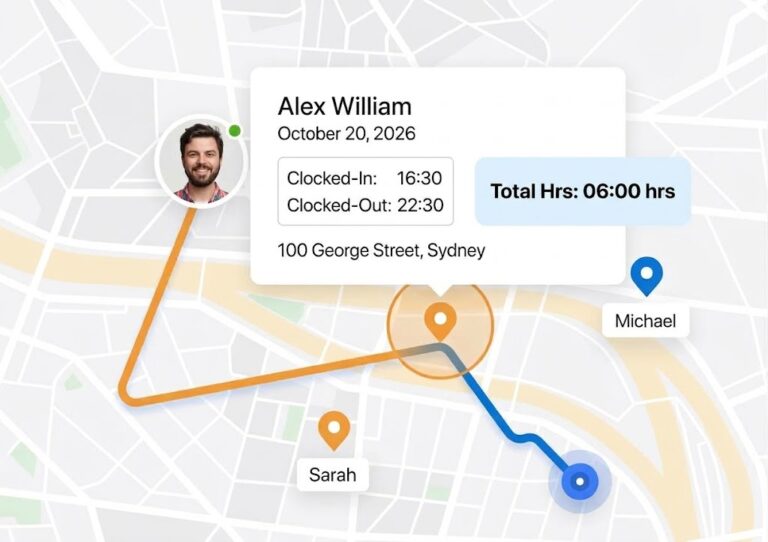
GPS Tracking
Track and view real-time GPS locations of your entire remote workforce on Google Maps
Real Time Alerts
Send immediate alerts to the monitoring center or company headquarter via SMS or Email
Remote Management
Reduce costs by eliminating the need for physical presence of supervisors at job sites
Location-based tracking
Eliminate Time Theft
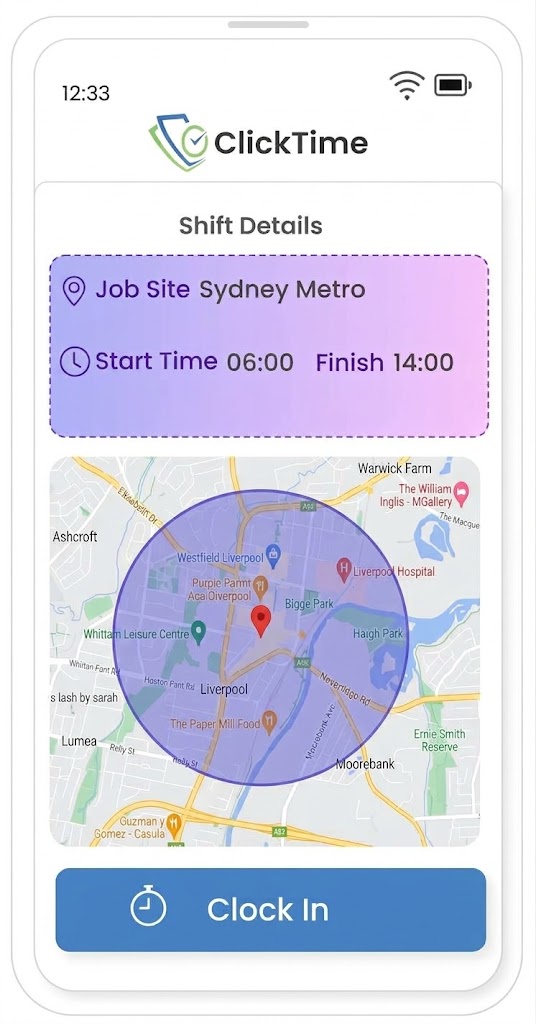
Mobile Timesheet App. Stop Wondering When and Where Your Employees Worked
Mobile Timesheet App
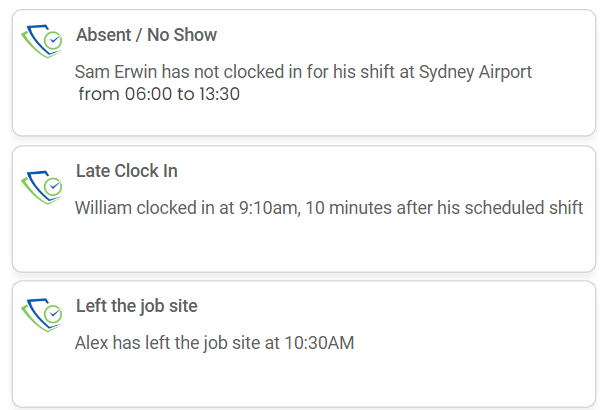
Get notified when staff don't show up to work
ClickTime cross-checks scheduled hours for all team members, promptly notifying managers of early, late, or missed clock-ins and clock-outs. This feature is especially critical when ensuring seamless operations and meeting client commitments.
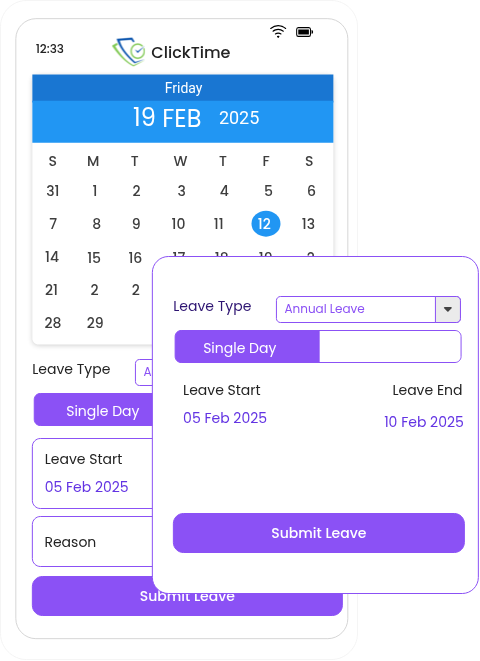
Leave management made easy
leave is tracked online and directly linked to timesheet and work schedules. And managers can approve leave requests via the web or on the go.
Stay On Top Of Your Business

Custom Timesheet
Supervisor Alerts
-
Employee Absence
-
Employee leaves the job site.
-
Employee clocks out early
Employee Alerts
-
Reminder for their upcoming shifts
-
Reminder to clock-in for the their shifts
-
Reminder to clock out

24/7 Time Tracking
Log in from anywhere and get a quick view of who is clocked in and working.
Time Tracking
Track clock-in and clock-out in real-time - specify the authorized locations where staff is permitted to clock-in - easily edit hours worked, approve shifts, and track labour hours in you budget.
Time Clocking Lockouts
Eliminate early , late Clock-in or Clock out by specifying a time window when employees can Clock in/out.
Time Attendance Approval
Approving and reject time attendance is a simple click of a button. Approve and reject multiple records. Save Time!
Field service management software that can be used across many industries







Accurate Timekeeping and Easy Check-In
Mobile time tracking
ClickTime’s mobile time tracking includes geofencing, which sends reminders to workers to clock in & clock out.
Additionally, supervisors will be alerted when employees do not clock in for their shifts.
Comply with you local regulations
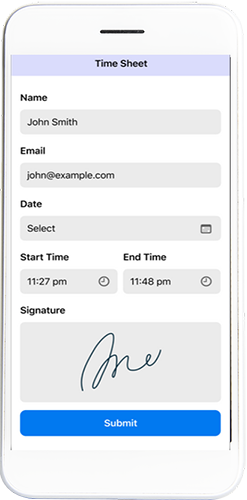
Certain industries and local government regulations requires employees to Sing-off on their timesheet before being paid.
Employee Timesheet Digital Signature
Supervisor, clients & customer can sign off on staff timesheet using the ClickTime app.
Digital Work Sign-Offs for Supervisors and Clients
Enhance clarity and assurance by introducing an additional layer of verification for the services rendered. Employees can now acquire a digital signature at the conclusion of each shift to affirm its completion.
Everything in timesheets
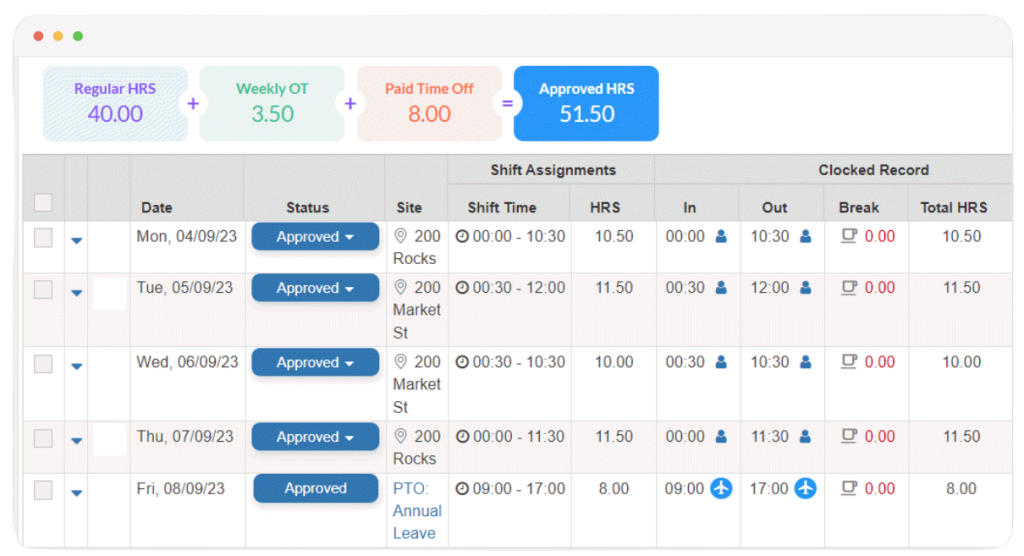
Access clock-in/out times, captured locations, payroll hours, and overtime all in one place. Streamline payroll processing and get clear insights into employee activity directly from your timesheets.
Beyond Geofencing
From geofencing to precise locations, ClickTime offers everything you need to manage time and attendance. With cutting-edge features like Toolbox Talk, News Feed, leave management, and Staff Compliance’s, you don’t have to waste your time with a laundry list of hyper-specialized software packages.
Check ClickTime Blogs

Timesheet With Award Interpretation

Award Compliance Simplified
Custom Pay Rate Templates
Eliminate buddy punching with employee photo verification
Timesheet Audit Trail

Get started in minutes
Set up geofences for various work sites and invite your team via email or a link. Need help? Support is just a tap away.
Frequently Asked Questions
A GPS timesheet app allows employees to clock in and out using their smartphones while recording attendance times and location information. Businesses can use this information to verify attendance, manage working hours and reduce manual timesheet entry.
How ClickTime helps: ClickTime combines mobile time and attendance with GPS and geofencing capabilities, helping Australian businesses manage employee attendance across multiple job sites and maintain more accurate digital timesheets.
Geofencing creates a virtual boundary around a workplace or job site. When an employee enters or leaves this area, the software can detect the event and use it to support attendance verification or automated clock-in and clock-out workflows.
How ClickTime helps: ClickTime uses GPS geofencing to detect when employees enter or exit configured job-site boundaries, helping businesses verify site attendance and streamline workforce timekeeping.
GPS time clock software can restrict or validate clock-in attempts based on an employee’s location relative to an approved work site. This helps reduce unauthorised clock-ins and gives managers better visibility of attendance discrepancies.
How ClickTime helps: ClickTime supports GPS and geofencing-based attendance workflows, helping businesses verify that employees are at the correct job site when recording their attendance, according to the configured settings.
This depends on the software and its configuration. Businesses should understand when location data is collected, how it is used and what controls are available to protect employee privacy.
How ClickTime helps: ClickTime is designed to support location-based attendance and job-site verification. Businesses should configure its location permissions and tracking behaviour to suit their operational needs and applicable privacy obligations.
GPS accuracy varies depending on the employee’s device, signal conditions, surrounding buildings and environmental factors. Geofencing uses a configured virtual boundary, but GPS readings are not always exact, so businesses should allow for occasional location discrepancies.
How ClickTime helps: ClickTime uses GPS and configurable geofences to support job-site attendance verification. This helps businesses establish whether employees are near their assigned locations when clocking in or out, subject to device and location accuracy.
Yes. GPS-enabled attendance software can record clock-in and clock-out events and use those records to populate digital timesheets. Managers can then review working hours, resolve discrepancies and approve timesheets for payroll processing.
How ClickTime helps: ClickTime connects mobile clock-in and clock-out workflows with digital timesheets, helping businesses reduce manual attendance recording and manage employee working hours across their workforce.
GPS-enabled workforce management software can provide location information associated with clock-in and clock-out events. Depending on the platform, managers can review attendance across multiple locations, identify missing attendance records and investigate discrepancies.
How ClickTime helps: ClickTime helps managers oversee attendance across multiple job sites through its timesheet features, making it easier to review employee attendance records and manage distributed teams.
Many workforce management systems integrate with accounting and payroll platforms or allow approved timesheets to be exported. This helps reduce duplicate data entry and makes it easier to transfer employee working hours for payroll processing.
How ClickTime helps: ClickTime supports integrations with Xero and MYOB, helping businesses connect workforce timekeeping with their payroll processes and reduce manual handling of employee hours.
Employee GPS tracking is generally permitted in Australia for legitimate business purposes, such as verifying attendance, managing work hours and confirming that employees arrive at their assigned job sites. However, employers must comply with applicable workplace surveillance, privacy and employment laws, which vary between states and territories. Depending on the jurisdiction and type of monitoring, employers may need to provide advance written notice and explain how location data is collected and used.
How ClickTime helps: ClickTime’s GPS and geofencing features help Australian businesses record employee attendance and verify job-site arrivals and departures. Employers should establish a clear location-monitoring policy, inform employees about the monitoring, and ensure their use of ClickTime complies with applicable legal requirements.
Yes. Many rostering systems include time and attendance features that record when employees start and finish work. Comparing rostered shifts with actual attendance helps managers identify late arrivals, early departures and discrepancies before approving timesheets.
ClickTime combines rostering with mobile clock-in and clock-out, GPS and geofencing capabilities, and timesheet management to help businesses monitor attendance at job sites.