Online Rostering Software
Flexible Ultra Fast Employee Scheduling
Create Roster
Publish Roster
Simplify Your Operations
Job Analysis & Cost Control
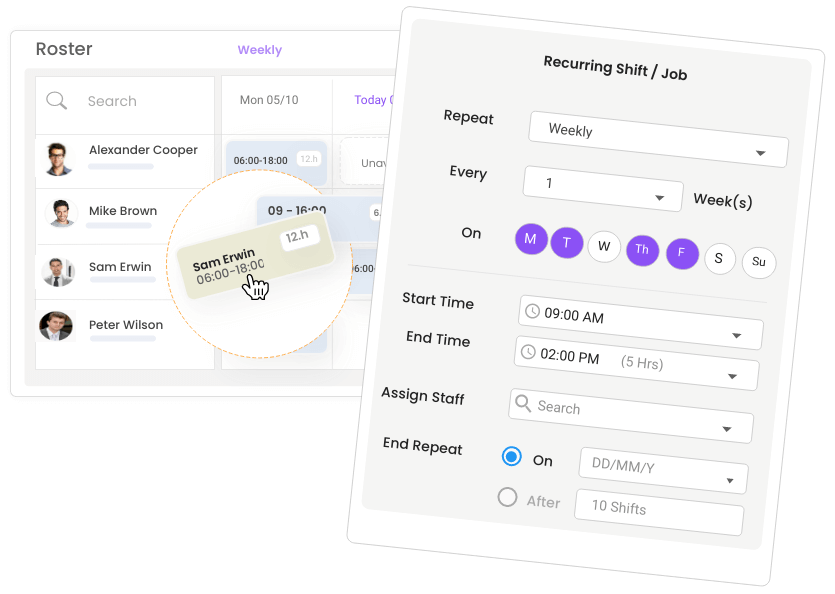
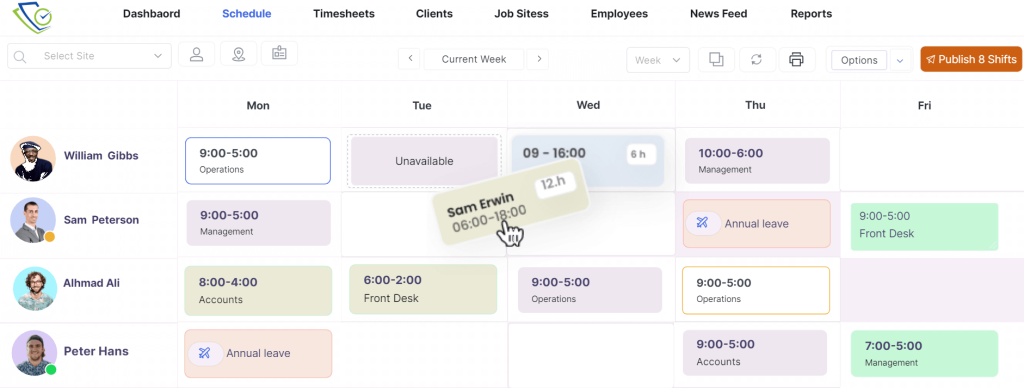
Easily Assign, Copy/duplicate and move shifts using drag and drop features. Save time and effort.
Online Rostering Software
Schedule Smarter, Not Harder
Lock Your Rosters
Tired and worry about unauthorized changes? ClickTime’s auto-lock feature automates the process, saving you time and ensuring accuracy. Experience peace of mind knowing your rosters are always secure and up-to-date.
Roster Conflicts
Guarantee Fair Shift Allocation and Eliminate Roster Overlapping & Conflicts
Roster Visibility
Gain Complete Insight into Employee Availability, Skills, and Working Days Preferences
Roster Publishing

Share Schedules Instantly with Your Team via the App

Streamline Shift Management by Allowing Shift Acceptance or Rejection

Quickly Communicate Scheduling Updates to Your Team

Share the Finalized Schedule with Clients Instantly via Email or Online
Gain visibility on employee shifts and holidays

Customize the way you view your employee shift schedules to optimize planning.

Easily view employee availability and leave requests directly within the scheduling interface. This real-time information empowers you to make informed decisions & avoid scheduling conflicts.
Because Excel Leaves Tasks Unfinished, Trust ClickTime to Get the Job Done
Recurring Shifts patterns
Create recurring shift patterns tailored to your business needs. Our platform makes setting up and maintaining weekly, bi-weekly, or monthly recurring shifts quick and easy.
Quickly fill a shift or find a substitute
Has someone dropped a shift and Can’t make it? With a few clicks, the scheduler can suggest the best available and free employees.
Advanced Fatigue Management
Break Time Deduction
Set your own rules for the automatic break time deduction based on your industry
All the features you expect and more
Take control and work smarter with a full set of features to help you manage your daily rostering operations
Repeat & Recurring Shifts
Schedule shifts without limits
Whether you need to scale your workforce for seasonal peaks or manage complex, recurring shift patterns, Our platform, including a powerful recurring shift feature, simplifies workforce management and ensures optimal staffing levels.
Manage Your Roster
Maintain your roster on the go, add new shifts, edit, delete & publish your roster from the palm of your hand
Timesheet Management
View your staff’s timesheet, add & edit your staff’s timesheet, approve & decline timesheet records
Quickly Check Attendance.
See who is working, late, absent, left the job site, left early , missing clock out, and much more..
Staff Leave & Availability
View and approve staff leave requests. View staff availability for work
Leave Management
Our smart leave management system allows employees to request time off via their mobile app for a hassle-free experience. Efficient scheduling is achieved by utilizing insights into staff availability and approved time off during planning.
Customise pay rates
Streamline your payroll with automated calculations of wages, overtime, penalty rates, and loadings for each shift. Our platform guarantees accurate costings by adhering to your industry’s specific award or enterprise agreement.
Document Sharing
Keep your team informed and compliant with our Document Hub feature. Easily upload and share essential documents, from standard operating procedures and work health and safety guidelines to company policies and updates.
Automated shift reminders
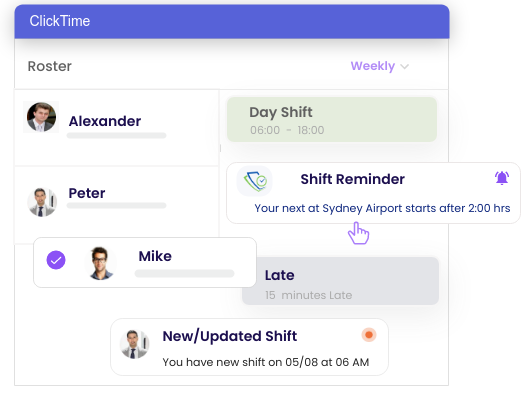
No more excuses, employees are automatically reminded by email & mobile push notification when they have upcoming shifts.
Shift Confirmation
Publish and assign shifts, and have employees accept or decline them via ClickTime mobile app. Simplify your scheduling and streamline operations.
Shift Change History
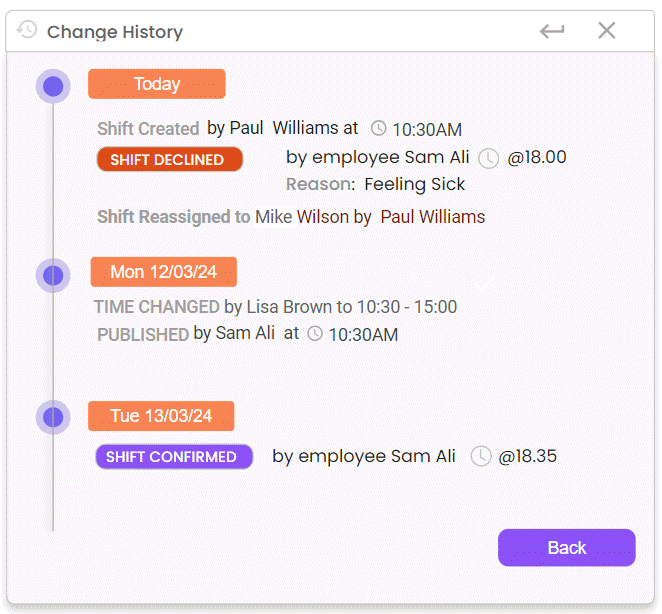
Using Shift History, you can find out when a shift was created, who assigned it, when it was published, when it was changed and who completed the actions.
Check ClickTime Blogs
Digital & Dynamic Forms
Go digital with ClickTime Form Builder. Simplify field inspections, site audits, and surveys on any device.
Tool Box Talk & News Feed
Share key updates with instructions, videos or posts, and capture mandatory digital sign-off for full compliance.
Tiemsheet With GeoFencing
Staff clock in within approved GPS boundaries, providing full accountability and proof of presence.
Staff Rostering Software
Flexible Ultra-Fast Staff Scheduling with Drag and Drop Anywhere, Anytime, for Total Control. Try it For Free
Daily Activity Report
The Daily activities or site diary helps you to stay up to date with all daily site activities and capture critical evidence.
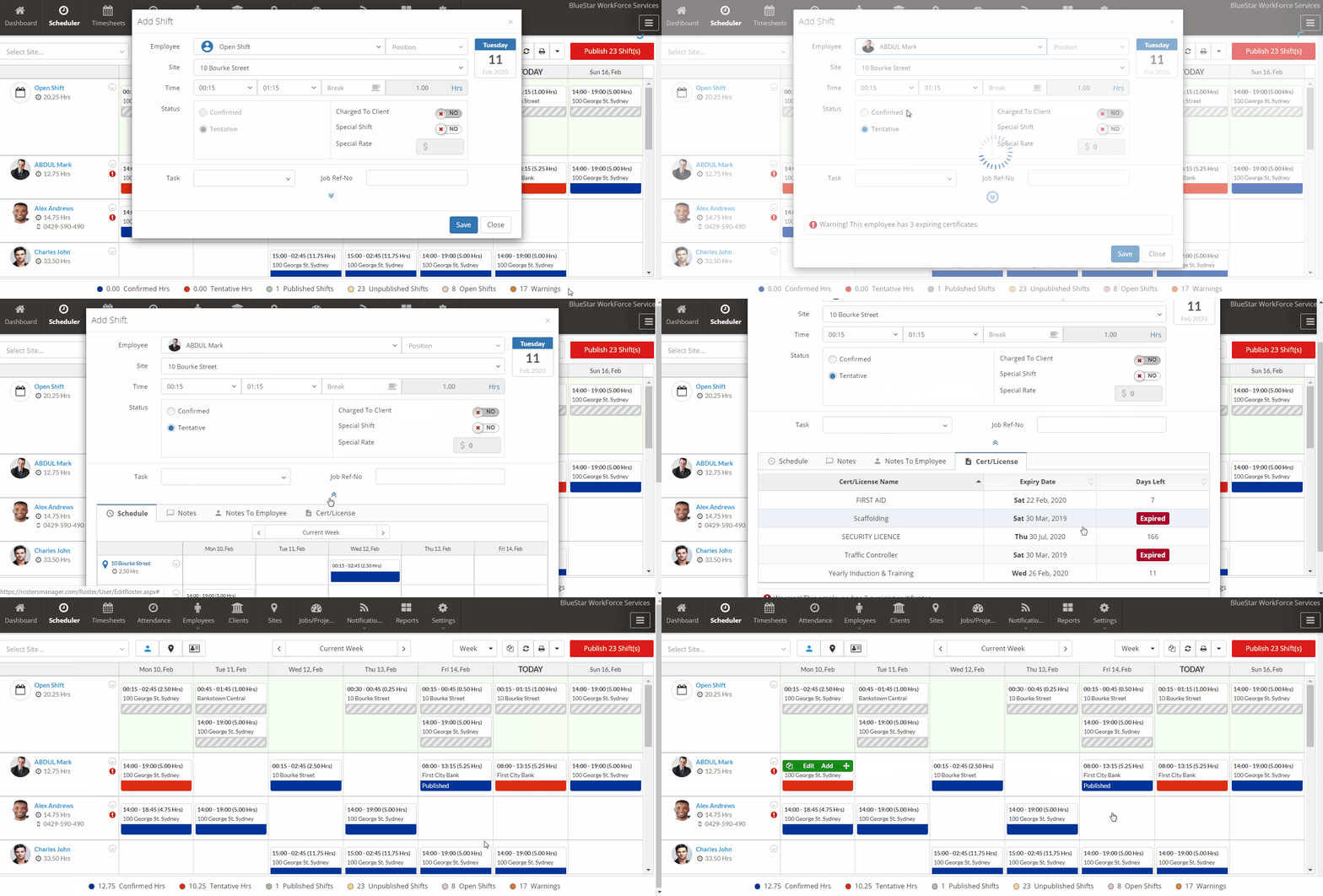
Get Instant Alerts For Licenses & Certification Expiry While Scheduling Employees
Questions & Answers
Employee rostering software makes it easy to create and manage staff schedules, assign employees to shifts based on their roles and qualifications, track attendance and working hours, and manage shift changes. It helps businesses maintain adequate staffing levels, control labour costs, simplify timesheet management, and improve communication between managers and employees. With ClickTime, you can manage rosters online, monitor employee attendance, and ensure the right people are assigned to the right jobs, anytime and from any device.
When choosing rostering software, look for an easy-to-use roster builder, employee availability management, shift assignment, mobile access, attendance tracking, timesheets and payroll integration. Businesses in regulated industries should also consider licence and qualification compliance.
ClickTime combines employee rostering with mobile attendance, GPS and geofencing, timesheets, compliance management and Xero and MYOB payroll integrations, helping businesses manage more of their workforce operations in one place.
Answer: Yes. Advanced rostering software automatically applies industry award rates, penalty rates, union rules, mandatory break times, and minimum rest periods between shifts. The system alerts managers to potential compliance breaches or overtime costs before schedules are finalized, ensuring adherence to local labor laws
Answer: Yes, modern rostering platforms feature peer-to-peer shift swapping. When an employee requests a swap, the system verifies that the replacement employee has the required skills, certifications, and availability without exceeding maximum weekly hours. Managers retain full control with an optional final approval step before the schedule updates
Answer: Yes, seamless integration with payroll systems (e.g., Xero, MYOB, KeyPay) and time clocking apps is a core feature. Clock-in/out data automatically populates digital timesheets, comparing scheduled hours against actual hours worked. This eliminates manual data entry, prevents payroll errors, and streamlines export for payment processing.
Yes. ClickTime supports payroll integrations including Xero and MYOB, helping businesses transfer approved workforce information into their payroll processes.
Answer: The software provides real-time wage forecasting as you build the schedule. By calculating projected gross pay (including penalty and overtime rates) in real-time, managers can identify high-cost shifts and adjust staffing levels before publishing the roster to ensure budgets are met.
Yes. Workforce compliance features help businesses maintain employee licence and qualification records, monitor expiry dates and identify missing or expired documents. More advanced systems can link required qualifications to specific roles or positions to help managers check eligibility before assigning shifts.
ClickTime supports employee licence and certificate records, expiry reminders and compliance management. Linking required qualifications to roles can also help businesses manage different compliance requirements across their workforce.
Yes. Mobile rostering allows employees to access their schedules without needing to contact a manager for every update. Depending on the software, employees may also be able to submit their availability, manage leave requests and respond to shift offers.
With ClickTime, employees can use the mobile app to access their schedules and relevant workforce features, helping managers and employees stay connected when working across different locations.
Yes. Many rostering systems include time and attendance features that record when employees start and finish work. Comparing rostered shifts with actual attendance helps managers identify late arrivals, early departures and discrepancies before approving timesheets.
ClickTime combines rostering with mobile clock-in and clock-out, GPS and geofencing capabilities, and timesheet management to help businesses monitor attendance at job sites.
The best rostering software depends on your workforce size, industry, number of job sites and scheduling requirements. Compare ease of use, mobile functionality, attendance tracking, compliance management, payroll integrations, reporting and pricing. Consider whether you need a basic staff scheduling tool or a complete workforce management platform.
ClickTime is worth considering if your business needs more than shift scheduling, particularly if you manage mobile employees, multiple job sites, attendance, timesheets and employee compliance through a connected workforce management system.