Workforce Compliance Software for Employee licences & Certifications
Manage Your Workforce & Ensure Compliance
All‑In‑One Compliance: Pre‑Start, Site Rules & Licence Tracking
Manage employee licences, certifications, qualifications and compliance requirements in one place with ClickTime workforce compliance software. Track expiry dates, send automated reminders, store digital documents and give managers a clearer view of workforce compliance before assigning employees to shifts or job sites. Designed for Australian businesses, ClickTime helps simplify compliance administration across multiple teams, roles and locations.
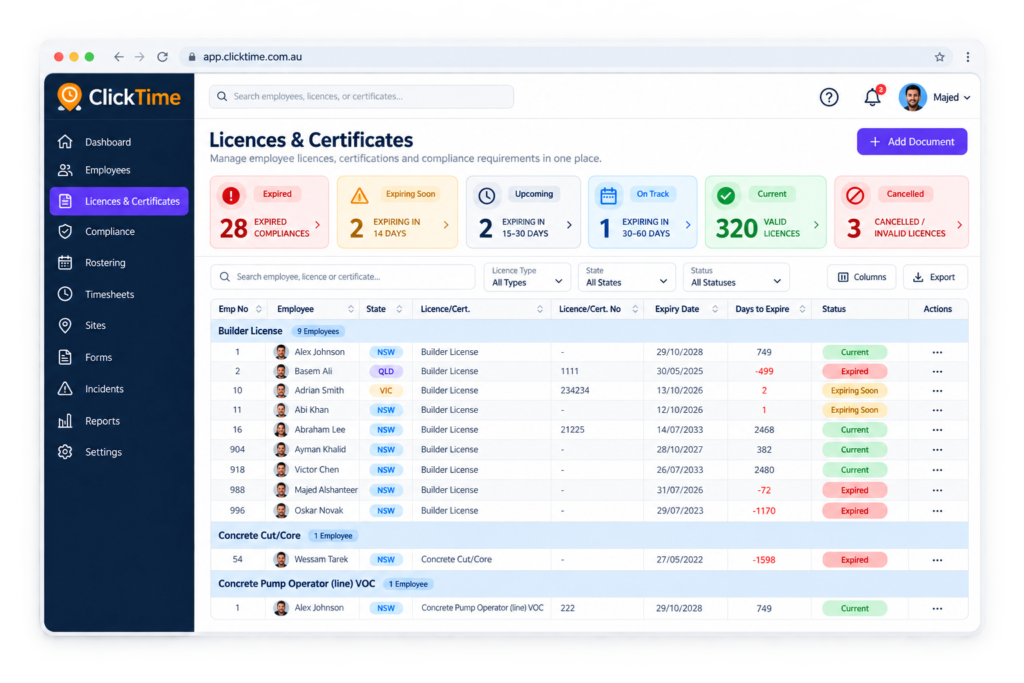
Workforce Licence and Certification Expiry Tracking
-
Track Employee Licences, Certificates and Qualifications
-
Receive Automated Licence and Certification Expiry Alerts
-
Store Digital Copies of Employee Documents
-
Identify Expired and Upcoming Compliance Requirements
Licence Management & Expiry Tracking
Never miss a license expiry again. ClickTime automatically tracks every certification, sends early reminders, and gives you a clear view of who is compliant and who needs renewal—keeping your workforce ready and audit‑safe.
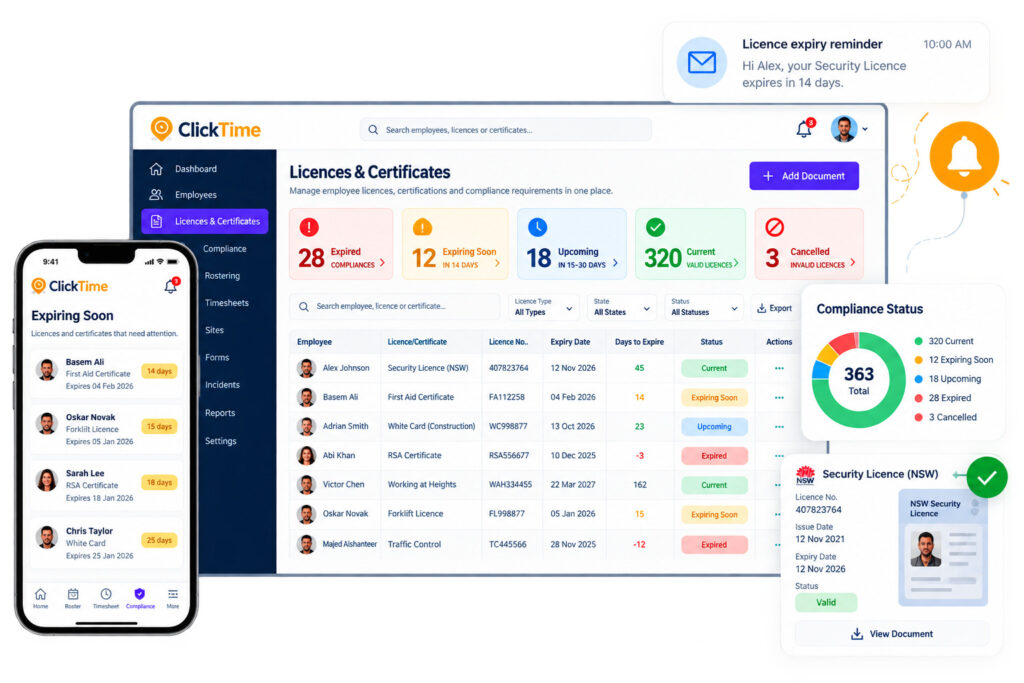

Simplify Your labour compliance

Industry Compliance Software
Already proven in the security, medical, trolley collections, construction industries.

Reduce Risk and Penalties
Reduce risk of heavy fines. Make sure all your staff licences are current and up to date
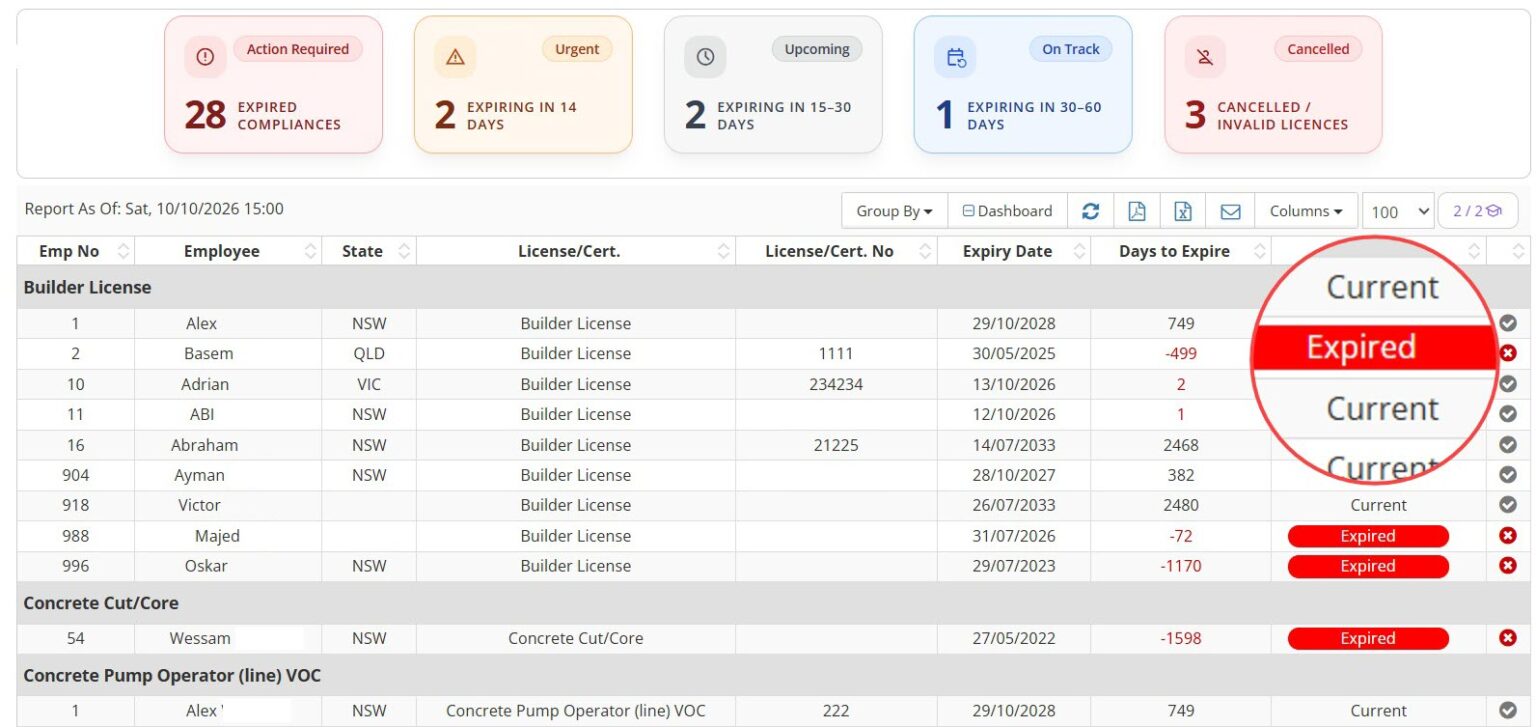
Compliance is Complex
Make Every Job Site Compliant Before Work Starts
How Employee Licence & Compliance Tracking Works
Protect Your Workforce with Automated Compliance Monitoring
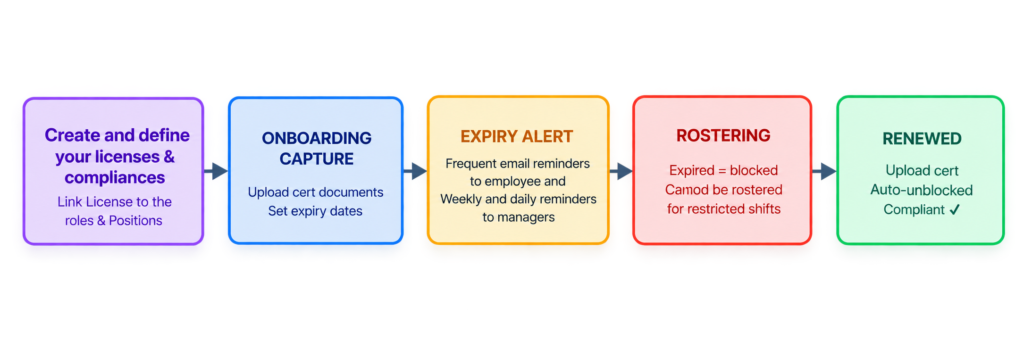
Workplace & Site Checklist
Manage Workforce Compliance Requirements by Role and Site
-
Create Compliance Matrices for Different Teams and Roles
-
Manage Site-Specific Compliance Requirements
-
Track Employee and Contractor Compliance
-
Identify Compliance Gaps Across Your Workforce
-
Custom Rules
Choose when forms must be completed: before shift acceptance, before clock‑in or before scheduling & allocation
-
Automated Enforcement
Workers must complete required forms before continuing, eliminating any manual follow‑up.
-
Frequency
Define how often staff must re‑submit forms—daily, weekly, monthly, or yearly.
-
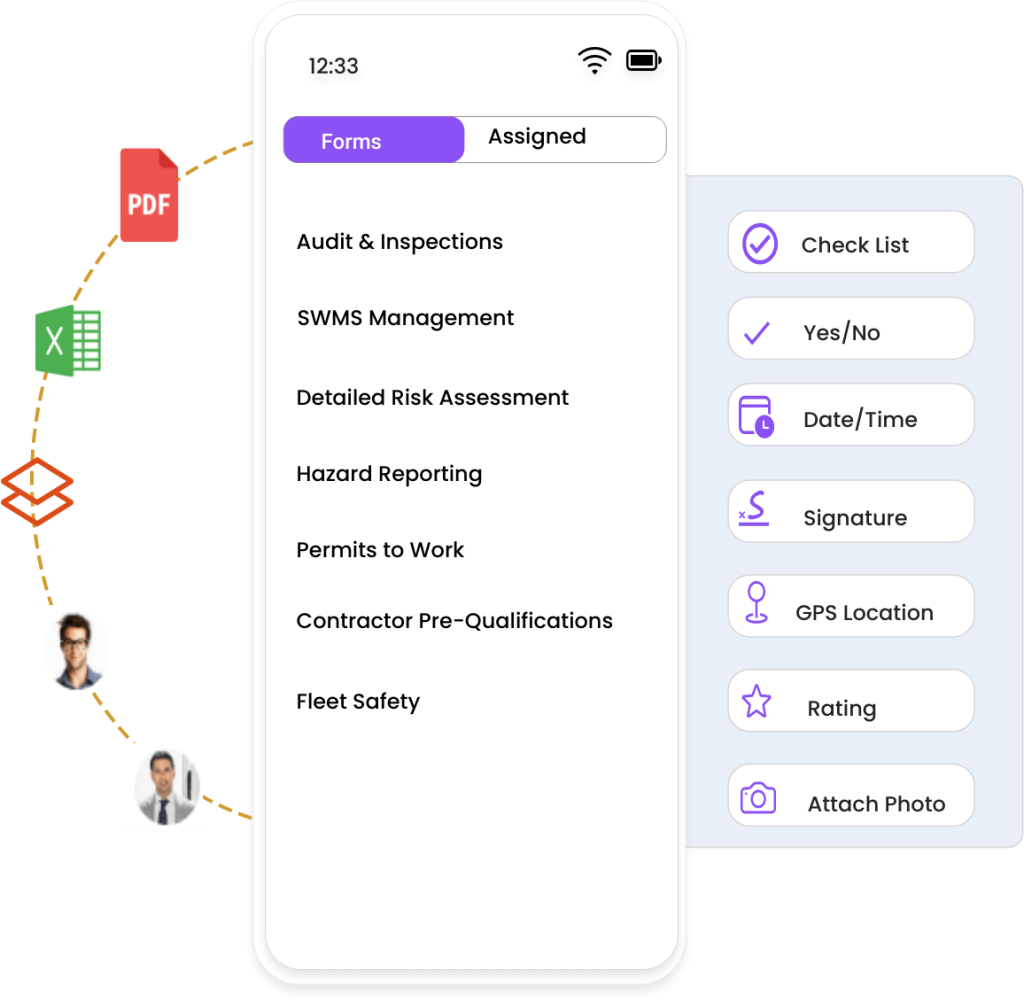
Mobile‑Friendly Experience
Staff members are guided with clear prompts and can complete forms quickly on their phone.

Keep Your Employees’ Documents Up-To-Date
- Stay fully compliant with expiration dates on employee documents and certificates
See expired qualifications while scheduling – preventing non-compliant candidates from working
- Automatically notify employees, supervisors about upcoming expiration, ensuring seamless compliance and preventing costly penalties.
Ensure certifications and licences are up to date
Rest assured that all work related certificates & licences remain valid without the hassle of constant follow-ups. ClickTime automatically reminds employees to update their documents before they expire
Check ClickTime Blogs

Hi Alex
Your First Aid is Expiring in 14 days.
Make Sure to Renew It
Track contractor documents and renewal dates.
Keep required documents, onboarding steps and renewal dates connected to the work your team already does.
-
Track every important date.
Record document expiry dates, action due dates and internal compliance checks in one place.
-
Remind the responsible person on time.
Choose when reminders go out and reach the right people
-
See what still needs action.
Review upcoming and overdue dates so you can follow up on outstanding actions.
Why Businesses Choose ClickTime for Workforce Compliance
Reduce Risk
Ensure every worker completes mandatory safety and compliance steps without delay.
Strengthen Safety Culture
Workers are reminded of safety expectations before starting.
Perfect for Multi‑Site Operations
Apply different rules to different locations, teams, or contractors.
Improve Accountability
Digital records provide a clear audit trail for every site, shift and worker.
Save Admin Time
No more chasing staff — ClickTime enforces compliance automatically.

-
Dynamic and intuitive matrix view
Create unlimited matrices to suit your specific business needs. Add different certificate/licence to each matrix
-
Visual Insights at a Glance
Gain an instant overview of your workforce's regulatory status. Identify potential issues and take proactive measures with ease.
-
Personalized Matrices
Tailor matrices to specific departments, job roles, ensuring your workforce stays on top of their required certifications.

Alerts & Notifications
Automatic notifications sent to your staff, management team and HR teams for upcoming expiring items

Dynamic Matrix
Utilize our dynamic matrix tool to instantly generate reports on training status and identify any gaps or expired certifications

Training Certification
Collect, retain and organize training records and certifications to warn of critical recertification dates. Track compliance with peace of mind

Upload Digital Copies
Upload digital copies of training/certification records directly into the system from any desktop or tablet
Standalone Compliance Tracking or Integrated With Rostering
Ensure Employees Meet Role Requirements Before Scheduling Shifts
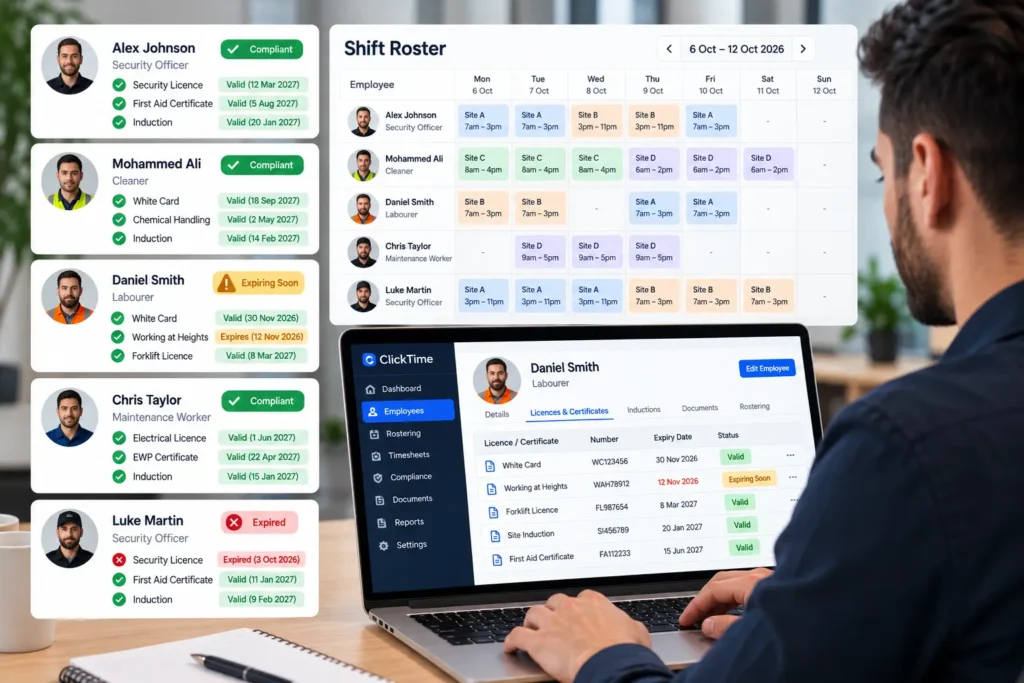
Track employee licences, certifications and qualifications alongside your rostering process. ClickTime helps managers identify expired or missing credentials, check compliance requirements for specific roles and positions, and make more informed staffing decisions across job sites.
Digital & Dynamic Forms
Go digital with ClickTime Form Builder. Simplify field inspections, site audits, and surveys on any device.
Tool Box Talk & News Feed
Share key updates with instructions, videos or posts, and capture mandatory digital sign-off for full compliance.
Timesheet With GeoFencing
Staff clock in within approved GPS boundaries, providing full accountability and proof of presence.
Staff Rostering Software
Flexible Ultra-Fast Staff Scheduling with Drag and Drop Anywhere, Anytime, for Total Control. Try it For Free
Daily Activity Report
The Daily activities or site diary helps you to stay up to date with all daily site activities and capture critical evidence.
Frequently Asked Questions
Employee licence tracking software helps businesses store, monitor and manage employee licences, qualifications, certificates and other compliance documents in one central system. It allows managers to record licence numbers, expiry dates and supporting documents, receive expiry reminders and identify missing or expired credentials before assigning employees to work.
ClickTime helps businesses manage staff compliance records and monitor licence and certificate expiry dates, reducing reliance on spreadsheets and manual follow-ups.
Businesses can use compliance management software to record each employee’s licenses and certificates, set expiry dates and receive reminders before renewal deadlines. A centralized system makes it easier to identify credentials that are valid, approaching expiry or expired, so managers can follow up with employees in time.
ClickTime helps businesses organise employee licence and certification records and manage expiry reminders from one place.
Yes. License tracking systems can help businesses identify upcoming expiry dates and send reminders, so employees and managers have time to arrange renewals. The available notification options and reminder settings depend on the software.
ClickTime supports license and certification expiry management with reminders to help businesses keep employee compliance records up to date.
Yes. Role-based compliance management allows businesses to define the licences, qualifications and certificates required for different positions. For example, a security guard may require a relevant security licence, while a construction worker may need a White Card. Managers can then assess whether an employee holds the credentials required for the work.
ClickTime supports compliance management alongside workforce rostering, helping businesses manage role-related requirements and assess staff compliance when allocating shifts.
Compliance software integrated with rostering can help businesses identify employees whose required licences or certificates have expired or are missing. Depending on the system, this can include warnings or restrictions when assigning shifts.
ClickTime combines workforce rostering with employee compliance information to help managers identify compliance issues before allocating work. Confirm the specific restrictions available in your configuration before relying on the system to automatically block a roster assignment.
Yes. Employee compliance software can centralize license details, certificate records, expiry dates and supporting document copies. This makes it easier for authorized managers to find the information they need without searching through emails, paper files or separate spreadsheets.
ClickTime allows businesses to maintain employee license and certification records, including uploaded document copies, helping keep compliance information organized and accessible.
Yes. Businesses that use contractors or subcontractors can use compliance management software to maintain their license and certification records, monitor expiry dates and check that the required documents are available before assigning work.
ClickTime supports employee and contractor compliance management, helping businesses maintain visibility of workforce credentials across their operations.
License tracking software helps prepare for audits by keeping employee credentials, expiry dates and supporting documents organized in a central system. Managers can review compliance records, identify missing information and locate relevant documents more efficiently when responding to an internal review, client request or regulatory inspection.
ClickTime helps businesses maintain centralized compliance records and monitor license and certification status, making it easier to review workforce compliance information when required. Audit requirements vary by industry and regulator.
Look for software that offers centralized employee records, configurable license and certificate types, expiry reminders, document storage, role-based compliance requirements, contractor tracking and visibility of compliance during rostering. Businesses should also consider whether the system supports their industry, relevant state and territory requirements, reporting needs and existing payroll or workforce management processes.
ClickTime brings workforce management, rostering and license and certification compliance features together in one platform, making it worth considering for Australian security companies, labor hire businesses and other organizations managing employees across multiple sites.
Yes. Many rostering systems include time and attendance features that record when employees start and finish work. Comparing rostered shifts with actual attendance helps managers identify late arrivals, early departures and discrepancies before approving timesheets.
ClickTime combines rostering with mobile clock-in and clock-out, GPS and geofencing capabilities, and timesheet management to help businesses monitor attendance at job sites.
The best rostering software depends on your workforce size, industry, number of job sites and scheduling requirements. Compare ease of use, mobile functionality, attendance tracking, compliance management, payroll integrations, reporting and pricing. Consider whether you need a basic staff scheduling tool or a complete workforce management platform.
ClickTime is worth considering if your business needs more than shift scheduling, particularly if you manage mobile employees, multiple job sites, attendance, timesheets and employee compliance through a connected workforce management system.
ClickTime supports automated security licence validation against the NSW Public Registry, helping security businesses check licence information as part of their workforce compliance processes. ClickTime also allows businesses to manage licence details, monitor expiry dates and receive reminders for upcoming expiries. Automated public registry validation is currently specific to NSW security licences; other Australian licences and certifications can be managed through ClickTime’s licence and compliance tracking features.